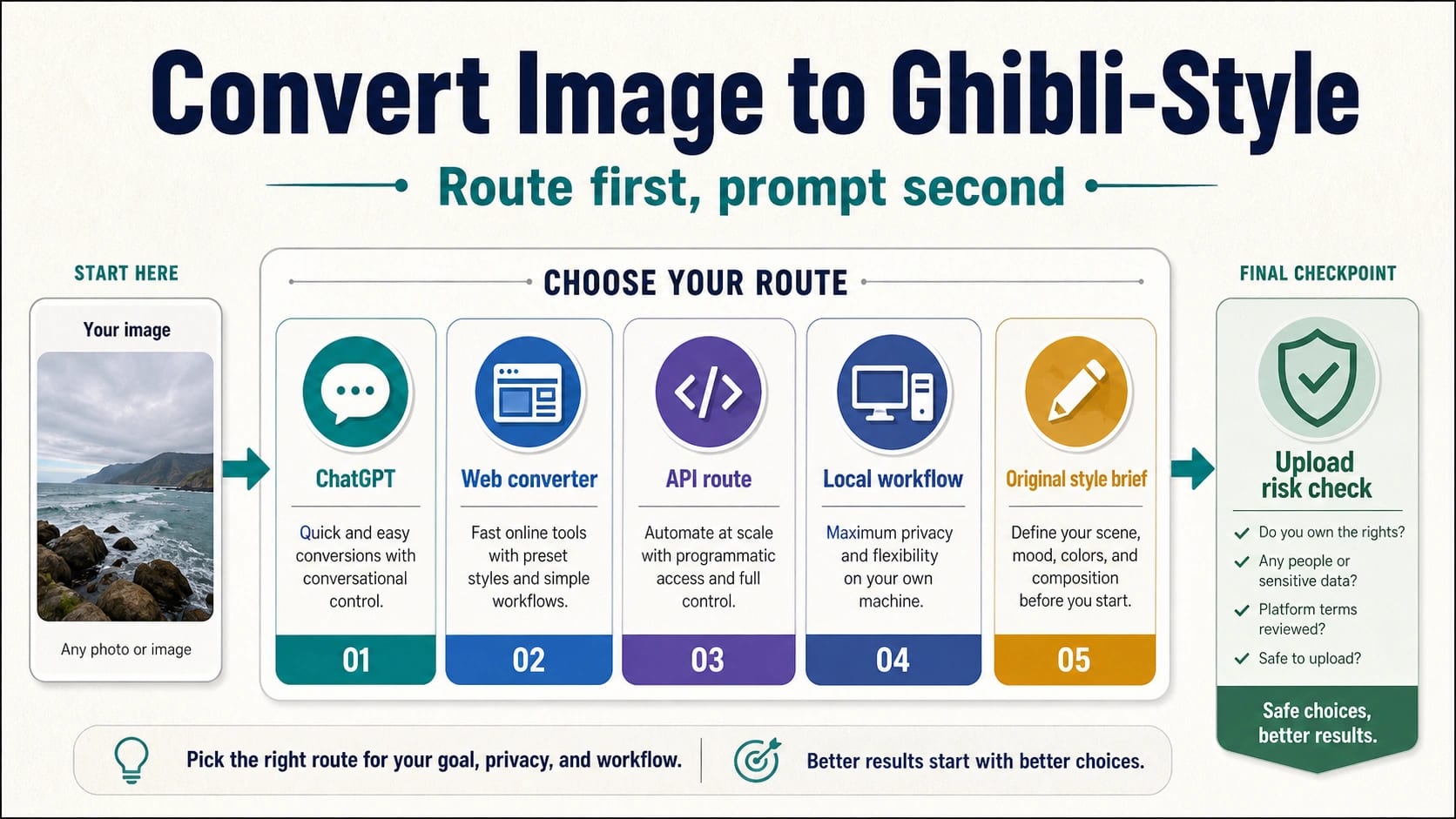
You can turn an uploaded photo into a Ghibli-style or Ghibli-inspired image, but the route matters before the prompt. Use ChatGPT for a mainstream conversational edit, use a one-click web converter only for low-risk personal images, use an API or local workflow when you need repeatability or privacy, and use an original style brief when the output may be client-facing or commercial.
Start with the route board: ChatGPT is the easiest conversational route, web converters are the quickest low-risk route, API workflows are for repeatable production, local workflows are for privacy and control, and original style briefs are safer when you need a result that feels inspired rather than copied.
Stop before upload if the image contains IDs, children, client secrets, medical records, or anything you would not want stored by a third-party tool. Also stop retrying when faces drift, text breaks, important details disappear, or the platform terms do not fit the way you plan to use the output.
These workflows are not official Studio Ghibli tools or licensed Studio Ghibli outputs. Treat ChatGPT and API capability claims as OpenAI-route claims, check each converter's current terms before commercial use, and keep the output wording honest: Ghibli-style, Ghibli-inspired, or soft anime storybook look, not an official studio result.
A safer prompt separates five jobs: what to preserve from the photo, what to change, what mood and lighting to add, what to exclude, and when a retry is worth it. That structure usually matters more than pasting a single magic phrase.
Pick The Route Before You Upload
The same source photo can belong in very different workflows. A selfie for a private chat, a pet portrait for social sharing, a client product mockup, a batch API job, and a paid illustration brief should not all go through the first free converter you find. The right starting point is the route, because the route decides what you can audit, what terms apply, how much control you get, and how easy it is to stop when the result drifts.
| Route | Best fit | Stop rule |
|---|---|---|
| ChatGPT | Casual edits, conversational refinement, and quick comparison prompts | Do not assume your account plan, image limit, or policy behavior matches someone else's screenshot. |
| One-click web converter | Low-risk personal photos where speed matters more than control | Do not upload private faces, client work, IDs, or unreleased assets to an unknown wrapper. |
| API route | Repeatable prompts, logging, batch work, and developer review | Do not ship code until the model, input format, policy boundary, and cost owner are clear. |
| Local workflow | Sensitive images, experimental ComfyUI-style pipelines, and maximum input control | Do not treat local generation as a rights shortcut; source-image permission still matters. |
| Original style brief | Client, brand, commercial, or portfolio work that should avoid brand imitation | Do not ask for a copy of a named film, frame, character, or studio output. |
ChatGPT is the route most readers try first because it can respond to a natural-language editing request and refine the result in conversation. OpenAI's own image documentation supports image input and image editing workflows, so it is fair to treat ChatGPT and the OpenAI image API as real routes. It is not fair to turn that into a universal claim about plan limits, queue speed, commercial rights, or exact moderation behavior. Those details can change by account, product surface, and policy update.
One-click converter pages satisfy the fastest version of the task: upload a photo, press a button, and get an anime storybook look. They can be useful for a public pet photo, a landscape, a synthetic test image, or a low-stakes avatar. They are weaker for any image that carries privacy, consent, brand, or client obligations. A converter's landing page may use words like free, HD, no sign-up, private, or commercial use, but those are route-owner claims. Check the current terms before relying on them.
API and local routes become important when the output is not a one-off trend image. Developers need request logs, repeatability, input validation, and a clear model owner. Local workflows need more setup, but they can keep files closer to your machine and give you more control over checkpoints, masks, prompts, and post-processing. Neither route removes the need to respect source-image rights or platform rules.
Do The Upload Risk Check First
The photo you upload matters as much as the words you type. Before any Ghibli-style conversion, sort the source image into three risk levels. Low-risk images are public landscapes, synthetic test images, objects you own, or casual photos that do not reveal private people, documents, or client material. Medium-risk images include recognizable faces, private interiors, brand assets, or work files you are allowed to process but would not want spread across unknown tools. High-risk images include IDs, children's faces, medical records, financial records, confidential client work, unreleased products, and anything covered by a stricter agreement.
Use low-risk images when you are testing a web converter. Use an auditable account, API route, local workflow, or manual editor for medium-risk assets. Do not upload high-risk assets to a public converter just to see whether the style looks good. A good result is not useful if the upload path itself was wrong.
The same rule applies to output use. A personal profile image, a private joke, and a mood-board experiment are not the same as a product listing, paid ad, album cover, book illustration, client deck, or merchandise design. When money, brand identity, or public distribution enters the job, move from "make it look like Ghibli" to a more original brief: warm hand-painted animation background, soft environmental light, rounded shapes, delicate watercolor texture, quiet countryside mood, expressive but non-specific character design.
That wording still gives the model a visual direction, but it avoids pretending the output comes from Studio Ghibli or from any specific film. It also gives a human designer or art director something they can revise without being locked to a brand imitation request.
Write A Preserve-First Prompt
Most weak prompts over-describe the style and under-describe the source image. The result may look charming, but the face changes, the pose shifts, the pet becomes a different animal, the background gets replaced, the clothing shape mutates, or text turns into decorative marks. A preserve-first prompt prevents that by naming what must stay stable before asking for the new look.
Use this structure:
- Target: name the person, object, pet, room, landscape, or product that may be restyled.
- Preserve: list the identity, pose, composition, camera angle, clothing silhouette, product shape, background layout, and readable text that must not change.
- Style direction: describe the result in original terms such as soft anime storybook look, warm hand-painted background, gentle painterly texture, rounded shapes, quiet pastoral mood, or whimsical environmental lighting.
- Exclusions: rule out exact characters, logos, film frames, private details, extra people, text changes, and new brand marks.
- Retry threshold: decide what failure means before generating again.
For a casual portrait, a workable prompt might be:
Transform this photo into a soft anime storybook portrait with warm afternoon light, hand-painted background texture, gentle rounded shapes, and a calm whimsical mood. Preserve the same person, facial structure, pose, clothing shape, camera angle, and background layout. Do not copy any specific movie frame, character, logo, or studio artwork. Do not add new people, new text, or new accessories.
For a pet image:
Restyle this pet photo into a cozy hand-painted animation look with warm window light, soft countryside colors, and a gentle storybook background. Preserve the animal's species, face markings, body pose, fur pattern, collar, and camera angle. Do not change the pet into a different breed or add fantasy characters.
For a product or client image, the prompt should become stricter, not prettier:
Create an original soft anime-inspired editorial version of this product scene. Preserve the product geometry, label placement, readable text, packaging color, camera angle, and foreground layout. Change only the environment into a warm hand-painted studio background. Do not alter the logo, invent label text, copy any named film, or imply official studio affiliation.
The best prompt is not the longest one. It is the one that tells the model which details are protected. If the first output changes identity, text, logos, product geometry, or a client's approved visual, stop and switch route. More adjectives will not fix a route that cannot preserve the required details.
Choose Safer Style Wording For Serious Work
"Studio Ghibli style" is the phrase many people use because it is short and recognizable. It is also too blunt for work that might be published, sold, or delivered to a client. For those cases, write an art-direction brief that describes the qualities you want without asking the model to copy a named studio, film, frame, or character.
Use this translation table when the asset matters:
| Instead of asking for | Write this kind of brief |
|---|---|
| "Make it exactly Studio Ghibli" | "A warm hand-painted animation look with soft environmental light and quiet storybook mood" |
| "Turn me into a Ghibli character" | "A gentle anime-inspired portrait that preserves the same person, expression, age impression, and pose" |
| "Copy a scene from a Ghibli movie" | "A peaceful countryside background with layered trees, warm sky, and painterly texture" |
| "Use the style of a specific film" | "Soft cel-animation influence, natural colors, rounded forms, and a calm illustrated atmosphere" |
This is not only a rights boundary. It is also a quality boundary. Brand-name style prompts often overfit the visible stereotype: big eyes, glowing grass, soft clouds, and a generic fantasy village. A descriptive brief gives you more control over mood, color, composition, and protected details. It also travels better across ChatGPT, API routes, local workflows, and manual art direction.
If you are working with a designer, give them the descriptive brief rather than an AI output alone. The AI result can be a mood reference, but the brief should explain the protected subject, desired mood, lighting, color range, allowed simplification, and what must remain accurate.
How Each Route Changes The Workflow
The ChatGPT route is best when you want to talk through the edit. Upload the image, state the preserve block, ask for one transformation, inspect what changed, then refine once. Keep the conversation narrow. If you ask for style transfer, background replacement, face preservation, text cleanup, and commercial-safe output in one sentence, the model has too many competing jobs.
The web-converter route is best when the image is safe and the decision is low stakes. Use a test image first. Check whether the tool asks for login, adds a watermark, limits resolution, stores uploads, or changes output rights. If the page does not make those terms clear, keep the output as personal inspiration rather than a publishable asset.
The API route is best when you need a repeatable system. Use official OpenAI documentation for OpenAI image input and editing details, and use the route owner's own docs for every other model or provider. Log the input image class, prompt version, model route, output review notes, and rejection reasons. That makes failures actionable: a blocked request, a changed face, a damaged logo, and a low-resolution output are different problems.
The local route is best when you need file control, experimentation, or a ComfyUI-style workflow. It can help when you want masks, reference images, exact seeds, or a private test pipeline. It also adds responsibility. You need to manage models, licenses, storage, and review yourself. A local workflow can reduce upload exposure, but it does not make every source image permissible to transform.
The original-brief route is best when the final asset matters. Start with the concept, not the brand shorthand. Define the subject, audience, mood, palette, setting, line quality, light, composition, and protected details. Then use AI, a designer, or a hybrid process to explore options. This route is slower than a one-click converter, but it is much better for client work.
When The Result Goes Wrong
Face drift means the model did not preserve identity. Add stricter identity language and retry once: same person, same facial structure, same age impression, same expression, same pose. If the second result still changes the person, stop using that route for identity-sensitive work.
Text and logo damage are not minor defects. Image models often make letters look plausible while changing the actual word, mark geometry, or layout. If a sign, product label, UI screen, package, or brand logo must stay exact, use AI for mood exploration and finish the text or logo layer in a traditional editor.
Over-stylization usually means the style request is overpowering the preserve block. Reduce the style language and increase the protected details. Ask for subtle storybook color grading, painterly background texture, and warm light rather than a total transformation.
Policy blocks or inconsistent refusals are route signals. Do not try to bypass a filter. Reword toward original descriptive art direction, remove exact film or character references, or switch to a route that is appropriate for your asset and use case. If a third-party converter fails, check that converter's own status, credits, input requirements, and terms before assuming every route is blocked.
Quality loss after repeated retries is a workflow problem. Return to the original image, make one smaller edit, or separate the job into layers: background style, subject cleanup, color grade, and final text/logo pass. Re-editing an already stylized output can compound blur, flatten faces, and erase the details you wanted to preserve.
Where Adjacent Image Guides Fit
If your real task is broader prompt practice, use the Gemini AI photo prompt guide for more copy-paste image prompt patterns. If your task is object removal, background replacement, product edits, or preserving identity inside Google's image-editing ecosystem, use the Nano Banana image editing guide instead. If you need a deeper Google image workflow, the Nano Banana Pro guide is the better next stop.
Those adjacent routes are useful, but they solve different jobs. A Ghibli-style conversion starts with an uploaded image and a recognizable visual shorthand. The durable work is choosing the processing route, protecting the source details, avoiding sensitive uploads, and turning the style request into an original, reviewable brief when the result matters.
FAQ
Can ChatGPT convert an image to Ghibli style?
ChatGPT can be a practical route for image editing and restyling, but do not treat one account's result as a universal promise. Use a preserve-first prompt, avoid exact film or character copying, and check current product behavior before relying on plan limits, speed, or output rules.
Is a free online Ghibli-style converter safe to use?
Use free online converters only for low-risk personal images unless you have checked the tool's current upload, storage, watermark, and output-use terms. Do not upload IDs, children, client work, private interiors, medical records, or unreleased brand assets to an unknown converter.
What is the safest prompt wording?
Use descriptive style language: soft anime storybook look, warm hand-painted light, painterly background texture, rounded shapes, calm countryside mood, and gentle illustrated atmosphere. Then add preserve rules for identity, pose, composition, clothing, product geometry, text, and logos.
Can I use a Ghibli-style AI image commercially?
Do not assume commercial use is allowed because a tool generated the image. Check the route's terms, the rights to the source image, whether recognizable people or brands appear, and whether the brief asks for a brand imitation. For serious work, move toward an original art-direction brief instead of a literal studio-style request.
Should I use Grok, ChatGPT, Nano Banana, or a web converter?
Use the route that fits the asset. ChatGPT is convenient for conversational editing, web converters are fastest for low-risk personal images, Nano Banana-style workflows can be useful for Google image editing tasks, API routes are better for repeatability, and local workflows are better when privacy and control matter.
Why did my converted image change the face or details?
The prompt probably did not protect the source strongly enough, or the route is weak at preserving identity and fine details. Add a stricter preserve block and retry once. If the second result still changes the face, text, logo, product geometry, or key background, switch route instead of adding more style words.
Is "Ghibli-inspired" better than "Studio Ghibli style"?
For personal searching, the shorthand is understandable. For publishable or client-facing work, Ghibli-inspired or soft anime storybook wording is safer and more controllable because it describes the visual qualities you want without implying official studio affiliation or copying a specific film.