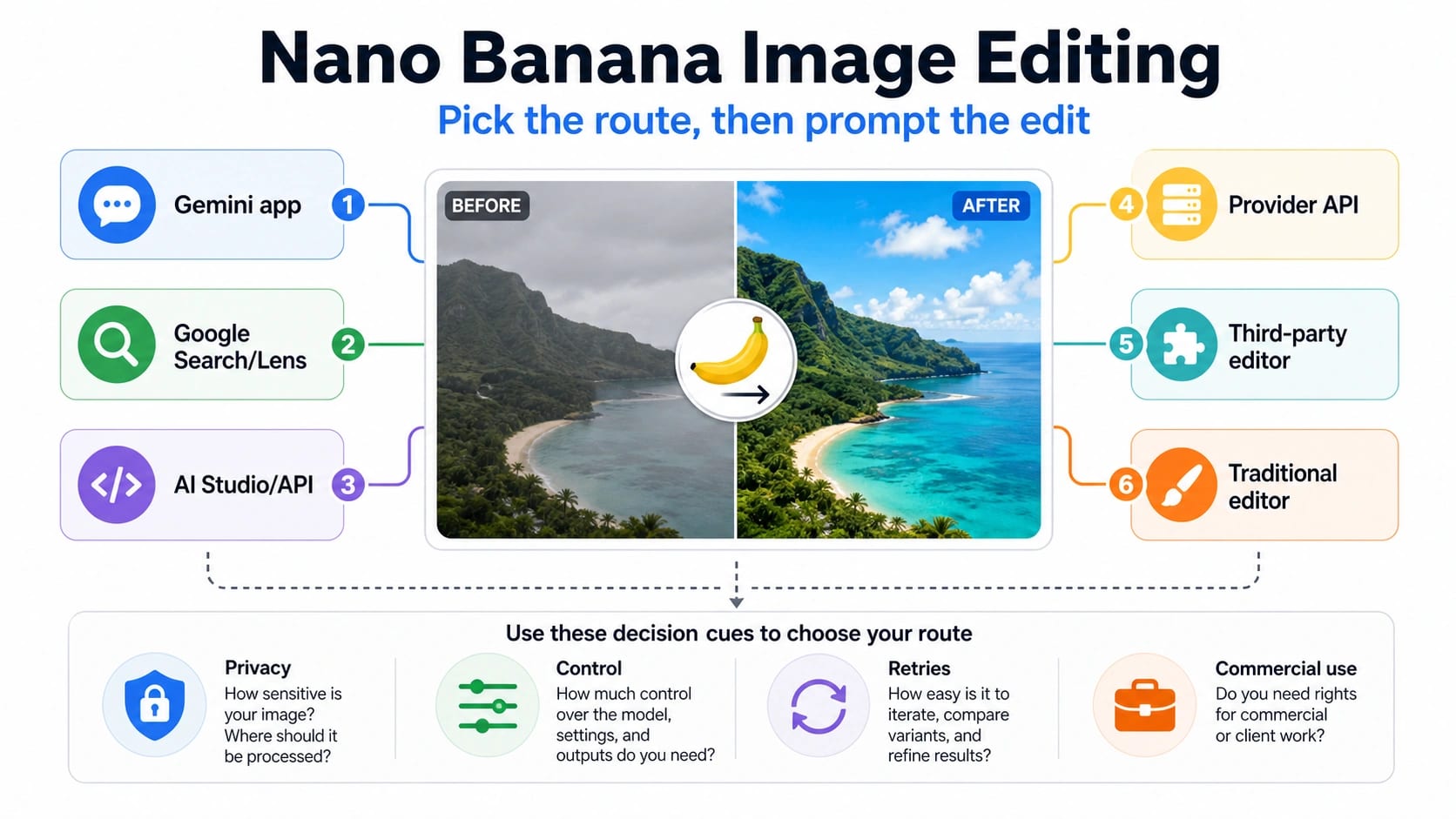
Nano Banana can edit an uploaded image, but the first decision is not the prompt. Choose the route first: use Gemini for the official consumer flow, Search or Lens for phone-first edits, AI Studio or the Gemini API when you need developer control, provider APIs for automation, third-party editors only after checking credits and rights, and a traditional editor when the asset is sensitive or precision matters more than speed.
| Editing route | Use it when | Stop rule |
|---|---|---|
| Gemini app | You want the official consumer route for a quick image edit. | Do not assume every Gemini result is an API contract or a provider feature. |
| Google Search or Lens | The job starts from a phone photo, visual search, or mobile discovery flow. | Do not upload private or client-sensitive images just to test a shortcut. |
| AI Studio or Gemini API | You need repeatable prompts, project controls, or developer logging. | Do not rotate keys or providers until you have checked model ID, project limits, and request errors. |
| Provider API | You need automation, batching, or a unified model gateway. | Do not rely on a provider page unless it names the model route, pricing basis, and retention terms clearly. |
| Third-party editor | You want a chat-style editor or browser workflow that wraps Nano Banana. | Check credits, output rights, privacy, and whether the editor is direct or only marketing around Nano Banana. |
| Traditional editor | You need exact retouching, regulated assets, brand text, logos, or guaranteed layout fidelity. | Stop retrying AI edits when identity, text, or fine geometry keeps drifting. |
The safest prompt pattern is simple: say what must stay unchanged, then say what should change, then name the constraints. For example, preserve the person's identity, lighting, camera angle, and background layout; replace only the jacket color; do not add new objects; keep all visible text readable. If the output changes the wrong thing twice, switch routes or use a manual editor instead of adding more adjectives.
Stop before uploading private faces, ID documents, confidential client material, or assets with unclear rights. Also stop when repeated Nano Banana attempts damage identity, text, logos, or product geometry; those failures usually mean the route is wrong for the job, not that the prompt needs one more synonym.
What Nano Banana Image Editing Means Now
Nano Banana is the market name people use for Google's image-generation and image-editing family, but the practical contract depends on where you enter. In Gemini, it appears as an image model and photo editor experience. In developer docs, the route is model-specific: as of July 8, 2026, Google AI Developers describes Nano Banana as four Gemini API models: Nano Banana 2 Lite (gemini-3.1-flash-lite-image), Nano Banana 2 (gemini-3.1-flash-image), Nano Banana Pro (gemini-3-pro-image), and legacy Nano Banana (gemini-2.5-flash-image). Third-party editors may use their own credits, wrappers, storage rules, and model labels.
That split matters because a prompt that works well in Gemini chat is not automatically the right production workflow for an API job, a provider endpoint, or a browser editor. Treat Nano Banana editing as a route decision plus a prompt workflow. Inpainting is only one mode inside that workflow: removing an object, changing a background, preserving a face while changing clothing, combining two images, or repairing a product mockup all need different constraints.
The durable fact to keep is that official Google routes add SynthID watermarking to generated or edited AI images. The fact to avoid overstating is anything numeric: daily free edits, provider credits, per-image prices, maximum resolution, speed, retention, and commercial rights can change by route and account. Use the route's own terms before you upload anything that matters.
Pick the Route Before You Upload
Use the Gemini app when the task is exploratory and the image is safe to upload. It is the simplest path for a consumer edit: attach the image, describe the change, review the result, and refine once or twice. It is not the best place to debug API model IDs, batch behavior, provider limits, or fine-grained asset governance.
Use Search or Lens when the image starts as a phone-first task. This is useful for visual discovery, quick transformation ideas, and casual edits that live near the mobile camera flow. It is not a clean production surface. If the image contains a private face, a document, a client product, or unreleased brand material, move the work to a controlled account and read the upload policy first.
Use AI Studio or the Gemini API when repeatability matters. That is where model IDs, request logs, project limits, and integration boundaries become visible. If your team needs to process product images, generate variants, or test prompt behavior across a batch, the API route is easier to audit than a consumer chat flow. For ordinary image-editing examples, Google uses gemini-3.1-flash-image through the Interactions API; Nano Banana Pro (gemini-3-pro-image) is better reserved for complex product mockups, factual visuals, and jobs that need stronger creative control.
Use a provider API or third-party editor only after the route owner is clear. A provider page can be useful for automation, billing consolidation, or model access, but the provider's terms govern credits, storage, output handling, and support. A browser editor can be convenient for non-technical users, but it should not be treated as a first-party Google contract unless Google says so.
A Safe Upload Workflow
Start by sorting the image into one of three risk levels. Low-risk images include synthetic demos, public marketing drafts, stock-style scenes, or internal test assets with no private people, client secrets, or regulated content. Medium-risk images include recognizable people, brand material, or client-adjacent assets that your account is allowed to process but still needs care. High-risk images include ID documents, private faces, medical or financial records, unreleased products, and anything covered by a stricter client policy.
For low-risk images, the consumer route is often enough. Upload the image, name the edit target, name the protected details, and ask for one change at a time. For medium-risk images, prefer an account and route you can audit. Check whether the route stores inputs, whether the output can be used commercially, and whether the team has permission to process the image. For high-risk images, use a manual editor, an approved internal tool, or a governed production route rather than a public wrapper.
The first prompt should not try to solve every problem. Write it as a short editing spec:
Preserve the person's face, pose, lighting, camera angle, and background layout. Change only the blue jacket to a matte black jacket. Do not add accessories. Keep all visible text unchanged and readable.
After the first result, judge what changed, not whether the image looks impressive. If identity changed, the prompt failed. If lighting changed, the preserve clause was too weak or the route was wrong. If text or logos degraded, stop asking the image model to fix exact typography and move that part to a traditional editor.
Prompt Recipes That Actually Help
Object removal works best when the surrounding context is clear. Instead of "remove this object," write the target and the expected fill: remove the red trash bin beside the door and continue the concrete wall, floor shadow, and left-side lighting naturally. If the object blocks too much unknown content, ask for a plausible fill but do not treat the output as factual evidence.
Background replacement needs a stronger preserve clause. Keep the subject's face, hair outline, pose, clothing shape, and camera perspective unchanged; replace the plain wall with a softly lit studio backdrop in warm gray. If the background color spills onto hair or edges, retry once with a narrower change, then move to a layered editor.
Style transfer should name what can change and what cannot. "Make it cinematic" is too broad. A better prompt says: preserve the product shape, label, visible text, and camera angle; change the lighting to a soft evening editorial look; add shallow depth of field; do not alter the logo or package geometry.
Product mockups need the strictest geometry language. Preserve the product dimensions, label placement, cap shape, and all text. Change only the surface reflection and background. If the model bends text or invents label details, stop using AI for that layer and place the approved product art manually.
Combining images is a route test. When you provide a reference style or second image, say whether it is a mood reference, material reference, identity reference, or composition reference. Do not assume the model will infer which image has priority.
The Prompt Formula
Use this order for most edits:
- Target: name the object, person, area, or background that may change.
- Preserve: name identity, pose, lighting, camera angle, layout, text, logo, product geometry, or background elements that must remain stable.
- Change: name the exact replacement, style, color, material, position, or environment.
- Context: add scene details only if they help the model understand the edit.
- Constraints: say what not to add, what not to crop, and what must stay readable.
- Output check: decide what would make the result unacceptable before you generate.
The preserve block is the part most beginners skip. It is also the reason route-first editing beats prompt stuffing. If you need to preserve exact text, a logo, a product label, a face, or a legal asset, the model may be the wrong tool for that part of the job.
Negative instructions help only when they are specific. "Do not make it weird" does nothing. "Do not change the face, hands, logo, text, camera angle, or background layout" gives the model real boundaries.
When an Edit Fails
Wrong-object edits usually mean the target was ambiguous. Add position, color, object type, and relationship to nearby elements. "Change the chair" becomes "change the small red chair behind the wooden table on the right side."
Identity drift means the route or prompt is not protecting the subject strongly enough. Add "same person, same facial structure, same age impression, same expression, same pose" and retry once. If the second result still changes identity, stop and use a safer route.
Text and logo errors are not small cosmetic issues. Image models can make typography look plausible while changing letters, spacing, or mark geometry. For brand, packaging, UI, signage, and document-like content, use AI for broad visual exploration and finish exact text in a traditional editor.
Quality loss after several retries is a signal to reset the workflow. Return to the original image, make one narrower edit, or switch route. Repeated edits on generated outputs can compound blur, flatten lighting, and create texture that looks polished but no longer matches the source.
Blocked routes need route diagnosis, not prompt drama. If Gemini fails, compare the same account on the web route. If the API fails, check model ID, project limits, response class, and request logs. If a wrapper fails, check the wrapper's incident or credit status before assuming Google direct routes are down. For deeper route recovery, use the Nano Banana Pro not working guide.
Developer and Provider Boundaries
For developers, the important split is consumer access versus API contract. Gemini chat can teach prompt behavior, but production code should use the documented model path for the route you are testing. Google AI docs currently separate Nano Banana 2 Lite, Nano Banana 2, Nano Banana Pro, and legacy Nano Banana API routes, so the model ID belongs in the developer section, not in the consumer opening.
Provider APIs can be useful when you need batching, a common billing layer, or a gateway across models. They also add another owner between your code and Google's model. Before using one, check which model it claims to call, how image inputs are retained, how output rights are described, how errors are reported, and whether price or credit claims are dated. Do not copy provider marketing into a production policy.
If you mainly need pricing, quotas, or free-route boundaries, use the dedicated Nano Banana Pro pricing and quota guide. If your question is whether Nano Banana is useful for video, use the Nano Banana text-to-video route guide. If you are comparing alternatives for local workflows, see the ComfyUI Nano Banana Pro alternative guide.
FAQ
Can Nano Banana edit an existing image?
Yes. The practical question is which route should edit it. Gemini is the official consumer route, Search/Lens fits mobile image workflows, AI Studio or Gemini API fits controlled developer work, and third-party editors should be checked for terms, credits, retention, and route ownership before upload.
Is editing with Nano Banana free?
Do not treat "free" as a single answer across all routes. Consumer access, paid plan capacity, API billing, provider credits, and third-party editor trials are separate contracts. If a route matters for cost, check its current terms instead of relying on old daily-limit numbers.
Is inpainting the same as editing with Nano Banana?
No. Inpainting is one editing job: changing or filling a selected part of an image. Nano Banana editing also includes restyling, background replacement, combining references, product mockups, outpainting, object removal, and prompt-based refinement.
Which prompt works best?
Use a preserve-first prompt: target the editable area, list what must stay unchanged, describe the change, add constraints, and define what would make the output unacceptable. The route still matters; no prompt can make a casual wrapper safe for confidential assets or exact brand typography.
When should I stop retrying?
Stop after repeated identity drift, text/logo damage, quality loss, private upload risk, unclear rights, or a route mismatch. More adjectives rarely fix a route problem. Switch to a controlled API route, a different surface, or a traditional editor.