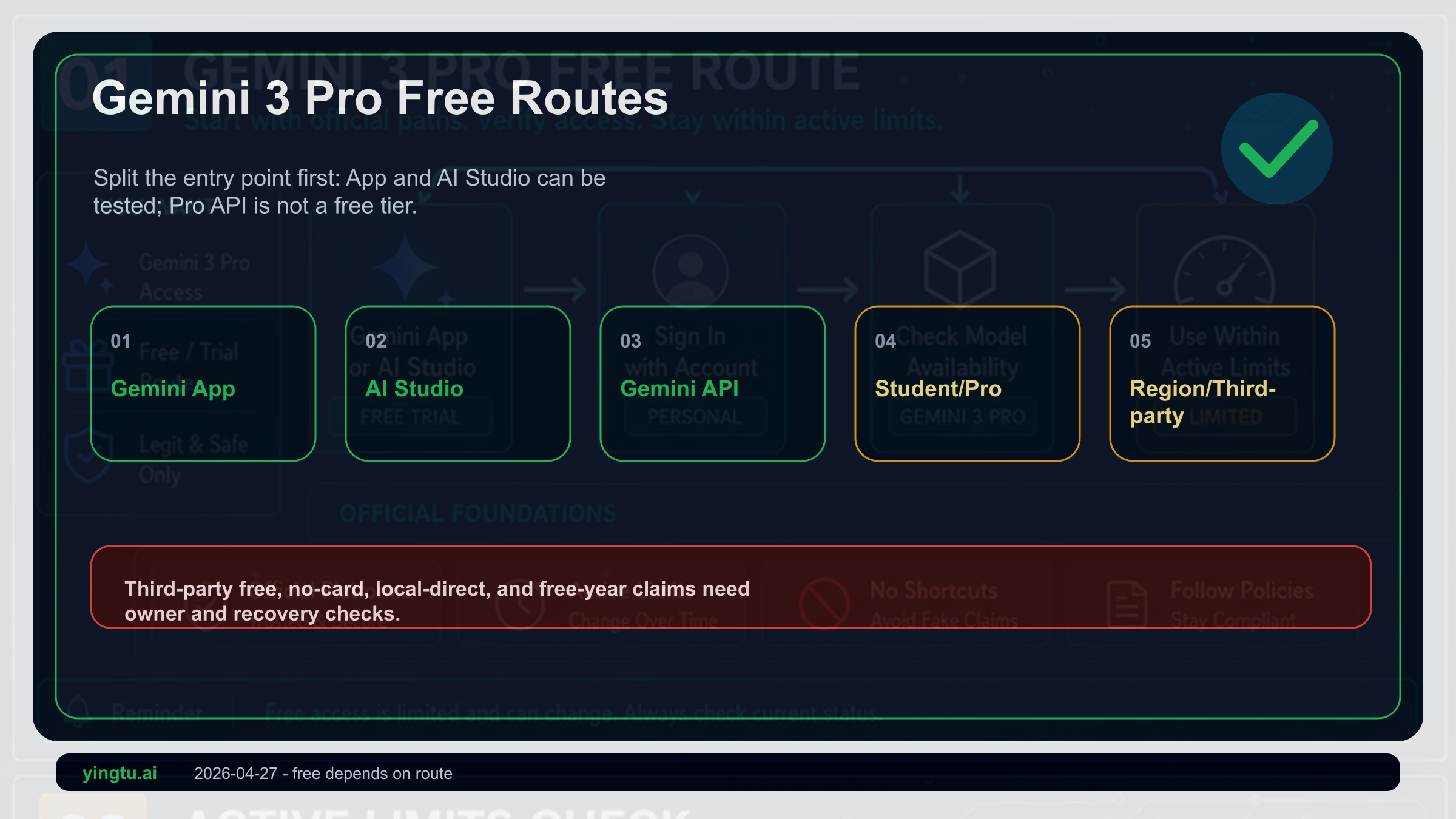
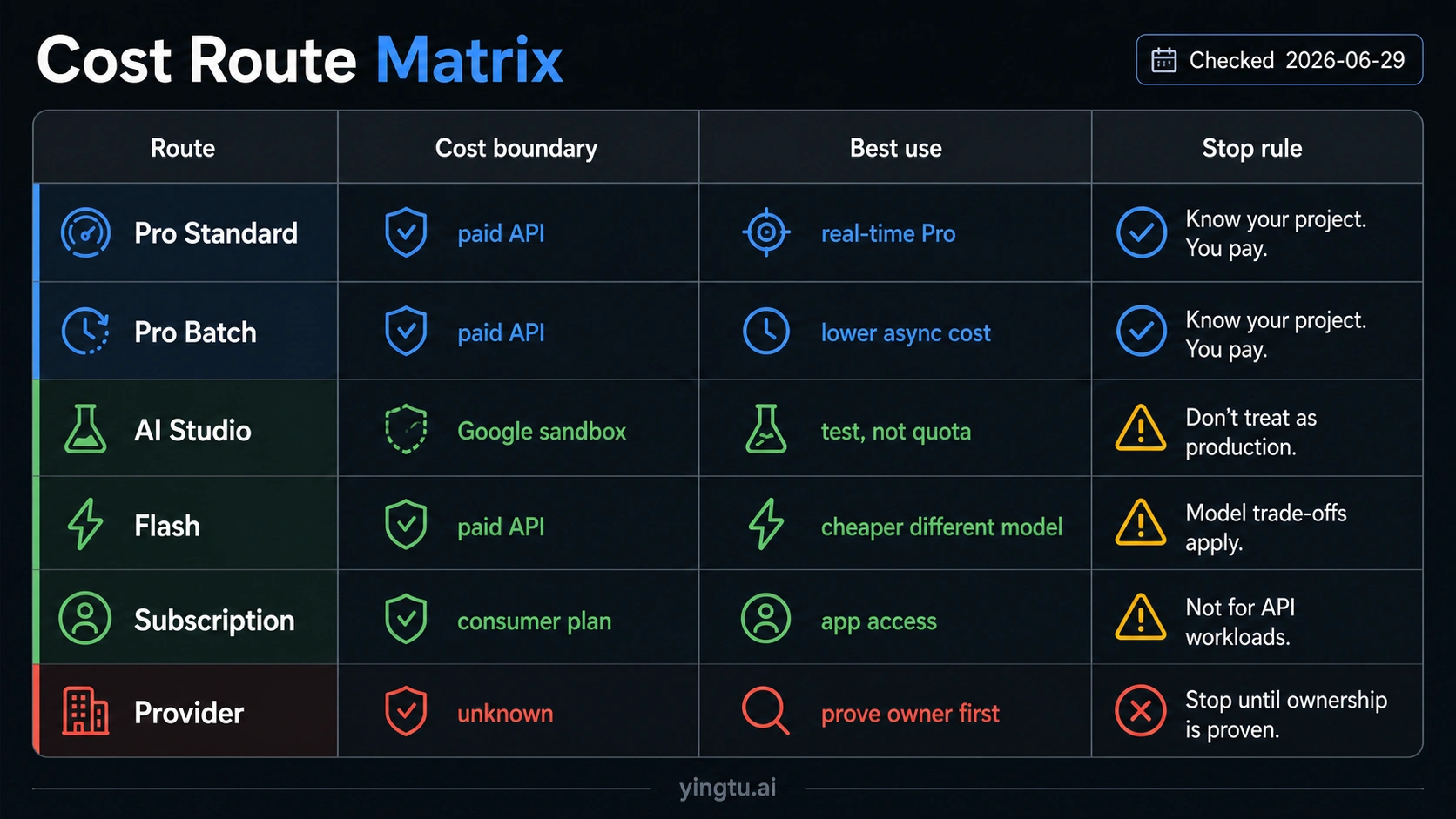
Current Gemini Pro Preview API work should start with gemini-3.1-pro-preview, not the old gemini-3-pro-preview route, and the Pro Preview API row has no Free Tier as checked on 2026-06-29. Cheap access is therefore a route decision: AI Studio can test the model, Pro Standard API calls are paid, Pro Batch can reduce async Pro spend, Flash is the cheaper official model route when a different model is acceptable, a Gemini subscription is a consumer-app route, and any third-party discount needs proof for model ID, billing, quota, data handling, support, and refund terms before you build on it.
Review the route split before you code or pay. It separates official Pro API pricing, AI Studio testing, Batch pricing, Flash substitution, consumer subscriptions, project quota, and provider shortcuts so the cheapest option does not quietly become the wrong route.
Start with the route owner, not the nickname
The phrase "Gemini 3 Pro Preview" is still useful shorthand for a reader who wants high-end Gemini Pro behavior at the lowest safe cost. It is not enough for billing, quota, or implementation. Developer decisions have to map the nickname to the current Google model row, then separate six routes that people often collapse into one "cheap Pro" answer.
| Route | What it can prove | Cost boundary | Use it when |
|---|---|---|---|
| AI Studio test | Whether the model fits prompts, output style, and early app exploration | Testing access is not the same as production API quota | You need fast evaluation before budgeting |
| Pro Standard API | Direct developer calls to the current Pro Preview model row | Paid per-token row for gemini-3.1-pro-preview | You need Pro behavior in production or integration testing |
| Pro Batch API | Async Pro processing at lower paid rates | Still paid, slower, and batch-shaped | You can wait for async jobs and want lower Pro spend |
| Flash route | Lower-cost official Gemini model route | Cheaper because it changes the model | The workload does not require Pro Preview quality or context |
| Gemini subscription | Consumer app entitlement | Not API billing credit | The job is chat, app access, or account-level use |
| Third-party provider | A provider-managed shortcut claim | Must prove model, billing, quota, data, support, and refund terms | Only after the route owner is clear |
That split is the core decision. A free AI Studio test can be useful, but it does not make Pro API production free. Batch can reduce Pro cost, but it does not remove billing. Flash can be the right cheap official route, but it is not the same model. A subscription can improve consumer access, but it does not automatically pay for API calls.
Map old gemini-3-pro-preview wording to the current Pro row
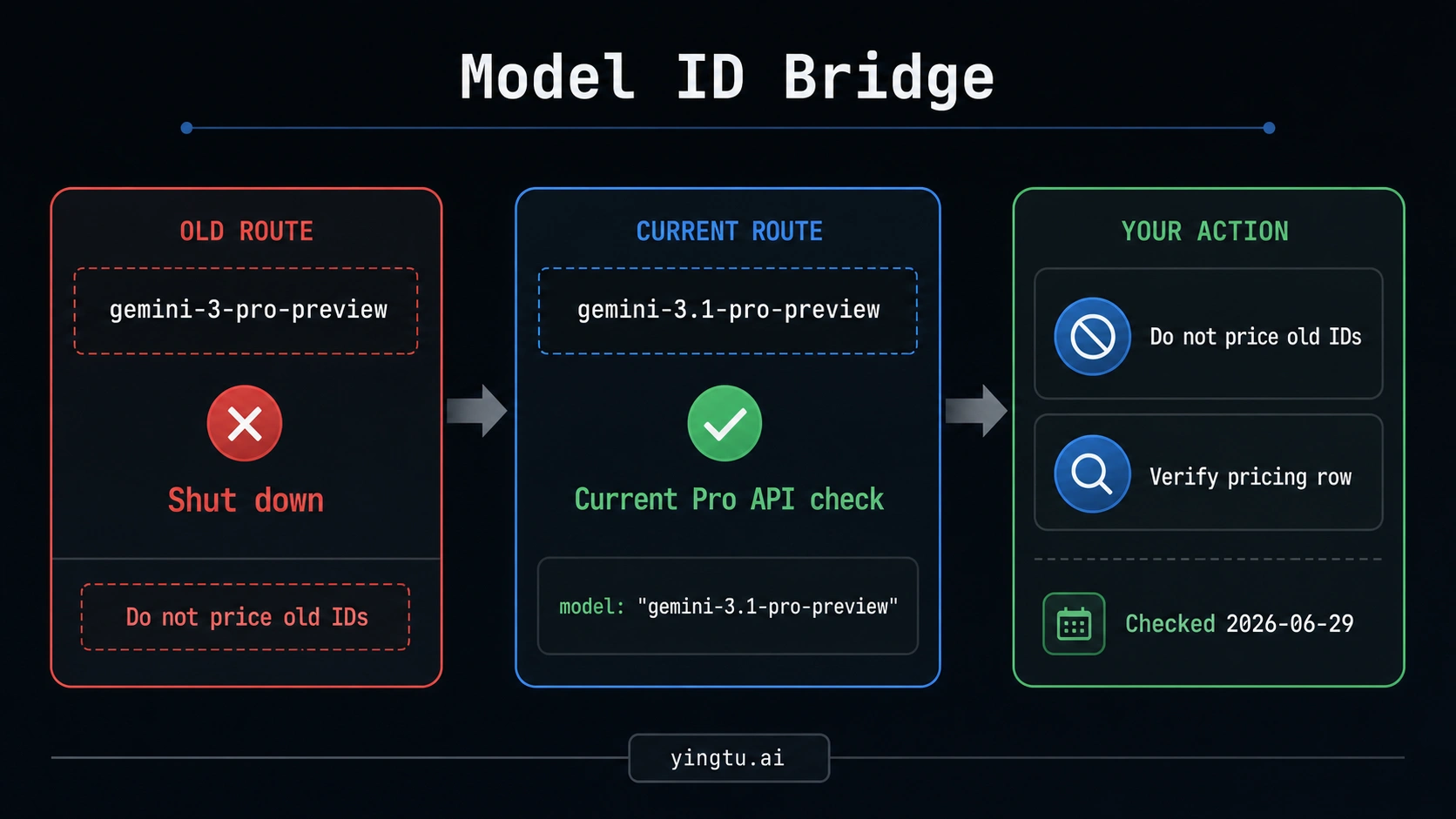
Start with the model row before comparing prices. Google's Gemini API model documentation lists the old gemini-3-pro-preview route as shut down, while current Pro Preview API work should be checked against gemini-3.1-pro-preview. That is why old calculators, copied snippets, and "Gemini 3.0 Pro Preview" wording can be misleading even when the general product family sounds familiar.
The pricing check also has to use the current row. On the Google Gemini API pricing page, gemini-3.1-pro-preview is a paid Pro Preview API row as checked on 2026-06-29. It does not show a Free Tier row. Treat that as the operating answer until the official pricing page changes.
This does not mean every Gemini route is paid in the same way. It means the Pro Preview API decision is paid, and the cheap path has to come from route choice: evaluate in AI Studio, pay for Pro when Pro is required, use Batch when async Pro work fits, switch to Flash when a different model is acceptable, or keep consumer app access separate from API billing.
What the current Pro pricing row means
For gemini-3.1-pro-preview, the paid Standard API row checked on 2026-06-29 lists two prompt-size tiers: input at $2.00 per 1M tokens for prompts up to 200k tokens and $4.00 per 1M tokens above 200k tokens; output, including thinking tokens, at $12.00 per 1M tokens up to 200k and $18.00 per 1M tokens above 200k. The exact tiers matter because a long-context Pro job can cost differently from a short prompt even before output grows.
Batch is cheaper, but it is not a free tier. The same pricing surface lists Batch input at $1.00 or $2.00 per 1M tokens by the same prompt-size split, and Batch output at $6.00 or $9.00 per 1M tokens. That can be the cheapest official way to keep Pro Preview quality for work that can wait, such as offline enrichment, corpus summarization, quality review, or backfill jobs.
Use a workload question before a price question:
| Workload shape | Better first route | Why |
|---|---|---|
| Prompt exploration, manual comparison, early demo | AI Studio | Lowest friction for evaluation, but not production API quota |
| Latency-sensitive API feature that needs Pro quality | Pro Standard API | Direct route, paid, easiest to reason about in app code |
| Async document or data processing that can wait | Pro Batch API | Lower paid Pro cost when batch delay fits |
| High-volume work that does not require Pro | Gemini 3.5 Flash or another Flash row | Lower official model cost because the model changes |
| Consumer chat or app use | Gemini app or subscription route | Account product, not a developer billing route |
| Claimed cheap Pro wrapper | Provider proof checklist | Vendor route must prove more than a headline price |
The practical mistake is comparing only the lowest number. The safer comparison asks whether the route still gives the model, latency, support, data handling, and quota owner the workload needs.
AI Studio is the test route; pricing is the API route
Google AI Studio is often the best first stop for a cost-sensitive developer because it lets you test model behavior before paying for production traffic. Google's Gemini 3 documentation says Gemini 3.1 Pro and Flash can be tried at no cost in AI Studio, while the developer pricing page still owns the API Free Tier answer.
That boundary is important. AI Studio can answer questions such as:
| AI Studio can help answer | AI Studio does not prove |
|---|---|
| Does this model follow my prompts? | That my production API calls are free |
| Are outputs good enough to continue? | That my project has enough RPM, TPM, or RPD for launch |
| Is Pro meaningfully better than Flash for this task? | That a subscription covers API spend |
| What should my first evaluation harness look like? | That a provider's cheap API is equivalent to Google's route |
Use AI Studio to reduce risk before spending. Then make a separate API decision from the pricing row, project limits, billing status, region availability, and data-handling needs. If the Pro API row is too expensive for the workload, do not try to stretch AI Studio into production. Change the workload shape, use Batch, move to Flash, or budget for paid Pro.
Batch lowers Pro spend only when async work fits
Batch is the cleanest "cheap Pro" lever when the workload truly needs Pro Preview behavior but does not need immediate responses. It keeps the Pro model route while changing the processing shape. That makes it useful for jobs such as nightly analysis, content QA, data enrichment, large document review, evaluation runs, or migration backfills.
It is a poor fit for user-facing chat, interactive editing, live coding assistance, or any flow where a person is waiting on the response. A cheaper token row does not help if the product requirement is immediate latency.
Before choosing Batch, check four things:
| Check | Why it matters |
|---|---|
| Can the job wait? | Batch cost savings depend on async tolerance |
| Does the job still need Pro? | Flash may be cheaper if Pro is not required |
| Is output volume predictable? | Output tokens can dominate long reasoning tasks |
| Can failures be retried safely? | Batch pipelines need idempotent retry and audit logic |
Batch should be described as a paid cost-control route, not as a hidden free tier. If a tutorial says Batch makes Pro free, stop at the pricing page.
Flash is cheaper because it changes the model
Gemini 3.5 Flash is the lower-cost official route when the workload can accept a different model. On the same Google pricing surface checked on 2026-06-29, Gemini 3.5 Flash has a Free Tier row and lower paid rates than Pro Preview: paid input at $1.50 per 1M tokens, paid output at $9.00 per 1M tokens, and Batch rows at $0.75 input and $4.50 output per 1M tokens.
That makes Flash attractive for many production tasks: classification, extraction, quick summarization, lightweight routing, first-pass drafts, and high-volume operations where Pro quality is not required every time. It is often the right cheap answer, but only if the product can tolerate the model substitution.
Use Flash when the evaluation says the answer quality, context behavior, latency, and failure modes are acceptable. Keep Pro when the job depends on deeper reasoning, longer-context quality, or output nuance that Flash does not consistently match. The cheapest official route is not always the correct route; it is the cheapest route that still passes the workload test.
For broader free-tier mechanics across Gemini API models, use /en/blog/gemini-api-free-tier. Keep the boundary narrower for Pro Preview: cheap access is a route decision, not a general Gemini API free-tier article.
Subscriptions are consumer access, not API billing
Gemini subscriptions can matter for consumer app access, account features, storage bundles, and higher usage inside Google's consumer product surfaces. They should not be treated as API credits unless an official API billing surface says so.
The separation is simple:
| Surface | Owner | What to verify |
|---|---|---|
| Gemini app or consumer subscription | Google consumer account route | Whether the signed-in account has the feature and limits needed |
| AI Studio | Developer testing route | Whether the project and account can test the model now |
| Gemini API | Developer billing and quota route | Model row, pricing, billing state, rate limits, data handling |
If a subscription page and the API pricing page appear to tell different stories, do not merge them. Use the subscription for consumer access and the API pricing page for developer calls. This keeps a useful app entitlement from being misread as a production billing plan.
Project limits belong to the project, not to each key
The Gemini API rate limits documentation frames limits with dimensions such as requests per minute, tokens per minute, and requests per day. The exact value that matters is the value attached to the project, model, tier, region, and current policy state you will actually use.
Creating multiple API keys inside the same project does not multiply capacity. Keys authenticate requests; the project owns quota and billing. Multiple keys are useful for environment separation, rotation, and security hygiene. They are not a safe way to turn a paid or limited route into a larger free pool.
Check limits in this order before building:
| Check | Question it answers |
|---|---|
| Project owner | Which project owns quota and billing? |
| Model ID | Are you calling gemini-3.1-pro-preview, Flash, or another row? |
| Pricing row | Is the model Free Tier, paid Standard, paid Batch, or unavailable? |
| Rate limits | What RPM, TPM, and RPD apply to this project and model? |
| Billing state | Is the workload running under free, paid, or upgraded terms? |
| Region and policy | Is the route available for the account and deployment context? |
Preview and experimental models can be more restricted than stable rows. That is another reason to keep a Flash fallback or a staged rollout plan when cost, quota, and reliability matter.
Provider discounts need proof before code
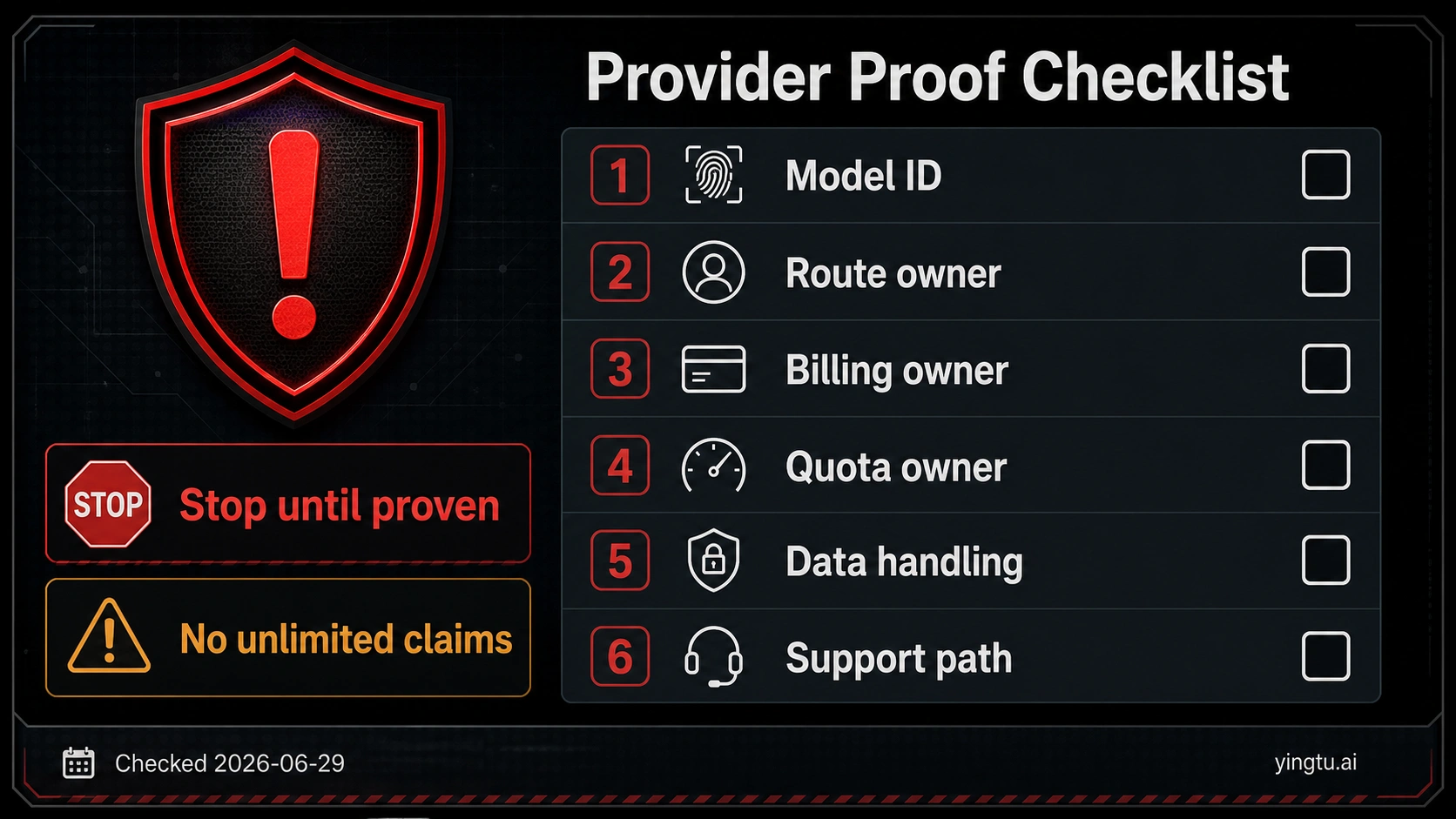
Third-party providers can be useful in some workflows, but a cheap headline is not enough evidence for a Gemini Pro Preview route. A provider claim remains provider-managed until it proves exactly what it is selling and which obligations it accepts.
Use this stop-rule checklist before signup, payment, or data upload:
| Required proof | Why it matters |
|---|---|
| Exact model ID | Prevents a Flash, cached demo, proxy label, or stale model from being sold as Pro Preview |
| Route owner | Shows whether the path is Google direct, a wrapper, a gateway, or a resale layer |
| Billing owner | Explains who pays Google and who invoices you |
| Quota owner | Tells you whether limits belong to your Google project, the provider, or a shared pool |
| Data handling | Matters for prompts, code, files, user data, retention, and training policy |
| Failure and support path | Defines who handles outages, refunds, retries, and incident response |
| Region and policy boundary | Prevents unsupported bypass advice from becoming infrastructure |
Do not publish or rely on provider prices, uptime, no-card access, unlimited claims, no-ban language, refund promises, or recharge bonuses unless those claims are verified from the provider's current terms and the route still fits the workload. Without that proof, the cheap provider option belongs in due diligence, not in the recommendation.
Recommended choice by reader job
The cheapest safe route depends on what the reader is trying to finish.
| Reader job | Recommended first move | Avoid |
|---|---|---|
| I want to see whether Pro is worth it | Test in AI Studio, then compare against Flash | Starting with provider signup |
| I need Pro responses in an app now | Budget paid Pro Standard API and monitor output tokens | Treating AI Studio access as API quota |
| I need Pro quality for offline work | Price Pro Batch and design async retry | Calling Batch a free tier |
| I need the lowest official production cost | Test Flash first, then escalate only if Pro wins | Saying Flash is the same as Pro |
| I use Gemini mainly as a consumer app | Check Gemini subscription/app access | Assuming subscription pays API invoices |
| I found a cheap API wrapper | Run the provider proof checklist | Trusting a headline price or copied model label |
This decision order keeps each route honest. AI Studio reduces evaluation cost. Pro Standard buys direct API behavior. Batch reduces paid Pro cost for async jobs. Flash lowers official cost by changing models. Subscriptions serve consumer access. Providers require proof before they deserve production traffic.
FAQ
Is Gemini 3 Pro Preview free through the API?
No for the current Pro Preview API row. Google's pricing page lists gemini-3.1-pro-preview without a Free Tier as checked on 2026-06-29. Use the official pricing row as the source of truth if that changes later.
What happened to gemini-3-pro-preview?
Google's current model documentation lists gemini-3-pro-preview as shut down. For current Pro Preview API checks, use gemini-3.1-pro-preview and verify the pricing row before writing code.
Can I use AI Studio for free instead?
AI Studio can be a good no-cost evaluation route for trying Gemini 3.1 Pro and Flash, but it is not the same thing as production API quota. Test in AI Studio, then verify API pricing, rate limits, billing, and project settings separately.
Is Batch the cheapest way to use Pro?
Batch is cheaper than Standard Pro API for async jobs, but it is still paid. Use it when the workload can wait and still needs Pro behavior. If the workload can use a different model, Flash may be cheaper.
Is Gemini 3.5 Flash the same as Pro Preview?
No. Flash is a different model route. It can be the cheaper official choice for many production tasks, and it has a Free Tier row checked on 2026-06-29, but you should switch only after testing that quality, context behavior, and failure modes are acceptable.
Does a Gemini subscription cover API calls?
Treat a Gemini subscription as consumer app access unless official API billing pages state otherwise. The API route still depends on project billing, model pricing, quota, and data-handling terms.
Can I create more API keys to get more quota?
No. API keys are credentials. Quota and billing belong to the project. More keys in the same project can help with rotation or environment separation, but they do not multiply RPM, TPM, or RPD.
Should I trust a cheap third-party Gemini Pro provider?
Only after it proves the exact model ID, route owner, billing owner, quota owner, data handling, support path, refund terms, and region or policy boundary. If those answers are missing, stay with official Google routes or choose a different model with a clear cost profile.
Final route order
Use this sequence when "cheap Gemini Pro Preview" is the goal: map the old wording to gemini-3.1-pro-preview, verify the official pricing row, decide whether AI Studio testing is enough, choose Standard Pro only when low latency and Pro quality are required, use Batch for async Pro jobs, test Flash before paying Pro for high-volume work, keep subscriptions separate from API billing, and reject provider shortcuts until the proof checklist is complete.
That order is less exciting than a free-method list, but it is safer. It lets a cost-sensitive reader spend less without losing track of model identity, billing owner, quota owner, and production risk.