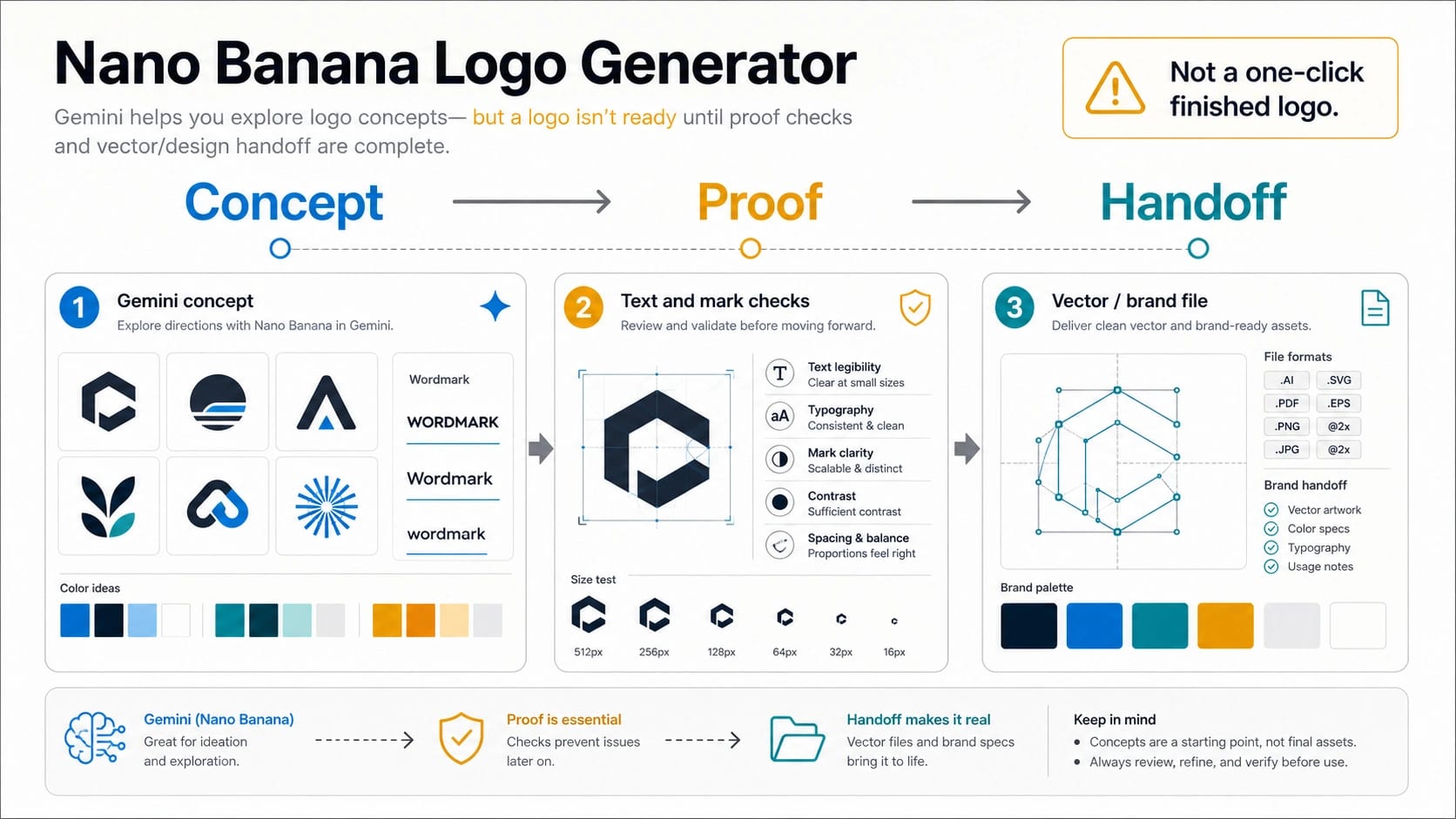
Nano Banana can generate logo concepts and mockups, but treat the first result as a draft: choose the right Gemini route, prove the name and mark at real sizes, then finish exact vector and brand-use work outside the image model. Use the Gemini app for quick concept exploration, AI Studio or API for repeatable prompt tests, third-party logo generators only after checking their terms, and a vector editor or designer for the final brand file.
Route answer: start with Gemini if you need ideas fast; move to AI Studio or API when you need repeatability; use a third-party generator only after checking its own terms; stop before upload or launch if the logo depends on legal clearance, licensed fonts, exact SVG paths, or a name you have not checked.
Prompt preview: give Nano Banana the brand name, mark type, typography feel, color system, style constraints, and output context; do not ask it for a finished legal brand file.
Proof rule: a usable logo must survive spelling, one-color, favicon, social avatar, small-size, mockup, originality, and vector cleanup checks before launch.
What Nano Banana Means For Logo Work Now
Nano Banana is the market name people use for Google's Gemini image generation family. It is not a separate Google product that only makes logos, and it is not a promise that every output is a production logo file. The official Google AI for Developers image generation docs currently map Nano Banana 2 to gemini-3.1-flash-image and Nano Banana Pro to gemini-3-pro-image. Google's consumer Gemini image generation page describes the app route through Create images and model choices in the Gemini interface.
That distinction matters because a logo task crosses two jobs. The first job is creative exploration: generate a wordmark direction, icon mark, badge, mascot, app icon, or brand moodboard. Nano Banana can be useful there because image models are good at visual variation, context mockups, color systems, and rough layout. The second job is brand delivery: exact spelling, exact letter shapes, small-size readability, one-color use, SVG cleanup, font ownership, name clearance, and production files. An image model can help you see options, but it does not replace those checks.
So the practical question is not "which Nano Banana logo generator is official?" The useful question is: which route should you use for the concept, what should the prompt contain, and what proof does the concept need before anyone treats it as a brand asset?
Choose The Route Before The Prompt
The same phrase can point to four different routes. If you choose the wrong one, a good prompt will not save the workflow.
| Route | Use it when | What it does well | Stop or switch when |
|---|---|---|---|
| Gemini app | You want fast logo ideas, moodboards, or mockups in a consumer interface. | Quick concept exploration with visible model choices and account-level limits. | The job needs repeatability, logging, API control, or confidential uploads. |
| AI Studio or Gemini API | You need controlled prompt tests, model IDs, file handling, and repeatable generation. | Engineering-friendly tests for multiple prompts, aspect ratios, and acceptance rules. | You only need one casual idea, or pricing and quota are not approved for the project. |
| Third-party logo generator | You want a ready-made logo UI or free-credit trial with a non-sensitive test idea. | It may package prompts, presets, and brand-kit UI faster than a blank chat box. | The page hides model identity, upload handling, credit rules, watermark rules, or commercial-use terms. |
| Vector editor or designer | The concept needs to become a real brand file. | Exact paths, typography, SVG/PDF exports, spacing, brand kit, and final review. | You are still exploring rough directions and have not chosen a concept yet. |
If the logo is for a throwaway project, a quick Gemini session may be enough to discover the visual direction. If it is for a client, product, campaign, app, or company identity, start with a safe sample and record which route generated the concept. The final owner of the brand file should be a vector workflow, not a screenshot from a generator.
A Better Logo Prompt Formula
Most weak logo prompts fail because they ask for a style without defining the brand system. "Make a logo for a coffee shop" gives the model too much freedom and gives you too little control. A better prompt tells Nano Banana what the mark must communicate, how the wordmark should feel, where the logo will be used, and what the output should avoid.
Use this structure:
hljs textCreate a logo concept for [brand name], a [business or product] for [audience]. Mark type: [wordmark / icon mark / monogram / badge / mascot / app icon]. Typography feel: [clean editorial / friendly rounded / premium serif / technical sans]. Color system: [primary colors, contrast needs, one-color version requirement]. Style constraints: [flat vector-like, no gradients, no tiny details, no stock symbols]. Output context: [website header, app icon, social avatar, packaging, pitch deck]. Proof request: show the mark at normal size, small size, and one-color use.
The best constraint is not always more detail. It is the detail that changes the decision. If the logo must work as a favicon, say that before you ask for decorative texture. If the brand name is easy to misspell, ask for a clean wordmark test before asking for a mascot. If the logo may need a one-color stamp, ask for that version in the same concept pass.
Do not ask for "a finished SVG logo" from an image generation route. Ask for a concept that a designer or vector editor can rebuild accurately. If you need exact SVG output, the handoff step owns that work.
Prompt Examples You Can Adapt
Use these as starting shapes, not as magic prompts. Replace the brand, audience, constraints, and output context with your real case.
| Logo job | Prompt shape |
|---|---|
| Clean SaaS wordmark | Create a logo concept for "North Ledger", a finance operations app for small teams. Mark type: wordmark plus simple abstract ledger icon. Typography feel: trustworthy technical sans, not playful. Colors: deep blue, white, one accent green, and a one-color version. Output context: website header, app icon, and pitch deck. Avoid coins, dollar signs, shields, gradients, and tiny details. |
| Local cafe badge | Create a badge-style logo concept for "Hollow Bean", an independent coffee shop for commuters and students. Mark type: circular badge with a simple cup or bean mark. Typography feel: warm but readable, not vintage clutter. Colors: espresso brown, cream, and one teal accent. Output context: cup sticker, storefront sign, and Instagram avatar. Include a one-color stamp test. |
| App icon | Create an app icon concept for "LoopNote", a personal note app for designers. Mark type: abstract loop icon, no wordmark. Style: simple geometric, high contrast, works at small size. Colors: charcoal, white, and electric cyan. Output context: iOS app icon and social avatar. Avoid paper sheets, pencils, and overly complex line art. |
| Mascot direction | Create three logo concept directions for "Spark Sprout", a kids science kit. Mark type: friendly mascot plus compact wordmark. Typography feel: clear and energetic, not babyish. Colors: bright green, yellow, and navy. Output context: packaging, sticker, and web hero. The mascot must still be recognizable in a small social avatar. |
After each generation, do not just pick the prettiest image. Ask which concept has a simpler mark, cleaner word shape, stronger small-size survival, and fewer cleanup problems. Those are the concepts worth moving forward.
Proof Checklist Before A Logo Becomes Usable
A generated logo can look polished and still fail the first real use case. Run the concept through a proof checklist before you spend time polishing it.
| Check | Why it matters | Pass condition |
|---|---|---|
| Spelling | Image models can distort letters, invent alternate spellings, or hide errors in decorative type. | The brand name is exactly correct in the main wordmark and any small previews. |
| One-color | A logo should survive black, white, or single-ink use. | The mark still reads without gradients, shadows, or photo texture. |
| Small size | Favicons, avatars, app icons, and mobile headers expose weak silhouettes. | The mark is recognizable at favicon and social avatar scale. |
| Favicon and avatar crop | A wide logo can fail in square contexts. | A square icon or simplified mark works without cutting off the core shape. |
| Mockup use | Logos behave differently on packaging, dark backgrounds, and UI headers. | The concept still works in the real surfaces you need. |
| Originality | A plausible mark can still resemble common symbols or a competitor. | You have checked obvious lookalikes and avoided direct reference copying. |
| Vector cleanup | PNG/JPG concepts do not give exact paths, kerning, spacing, or brand files. | A vector rebuild or designer cleanup can reproduce the chosen direction precisely. |
This is also where you decide whether to stop prompting. If the spelling keeps drifting, do not spend ten more attempts trying to make a production wordmark inside the image model. Use the best visual direction as a reference, then rebuild the wordmark with real type and vector tools.
When Nano Banana 2 Is Enough And When Pro Is Worth Testing
The official Gemini image docs position Nano Banana 2 as the default cost and latency route, while Nano Banana Pro is the higher-end route for professional output, stronger text rendering, richer reference control, and higher output-size needs. For logo work, that translates into a simple threshold.
Start with Nano Banana 2 when the job is concept exploration:
- You need several rough directions quickly.
- The logo is mostly icon or shape exploration rather than dense text.
- You are testing color systems, composition, and brand mood.
- The output only needs to guide a human designer or vector rebuild.
Test Nano Banana Pro when the cost of a failed concept is higher:
- The mark has dense text, multilingual text, signage, packaging, or layout-heavy use.
- You need stronger instruction following before presenting to a client or team.
- The concept must preserve multiple reference images or a more specific brand system.
- You are producing a high-resolution mockup that will go into design review.
Do not make Pro the default just because the label sounds safer. Run the same brief, same brand name, same constraints, and same acceptance checklist on both routes when the decision matters. If the cheaper route already passes the proof checklist, use the saved budget for vector cleanup.
For broader model-route comparisons, use the GPT Image 2 vs Nano Banana Pro comparison. For image size and file-dimension decisions, use the Gemini 4K image generation API guide. Keep the logo decision focused on concept quality, proof checks, and brand-file readiness.
Third-Party Logo Generators Are Separate Contracts
Third-party Nano Banana logo generator pages can be useful when they package a simple UI, prompt presets, or brand-kit fields. They can also blur the route. A page may say it is powered by Gemini, offer free credits, or promise quick logo output, but that does not make its credit rules, watermark policy, upload handling, or commercial-use terms official Google facts.
Before uploading a real brand brief, check:
- Model identity: does the page clearly explain which model or provider is used?
- Credit owner: are free credits, daily limits, or paid plans owned by the wrapper?
- Watermark and export: does download quality differ between preview, free export, and paid export?
- Upload and storage: can you tell whether uploaded references, brand names, or prompts are stored or reused?
- Rights language: does the page avoid overpromising legal clearance or exclusive ownership?
- Support path: what happens if the generation fails, credits are consumed, or the file cannot export?
Use a wrapper with a disposable sample if it helps you explore. Use an official route when you need model-owner clarity. Use vector or design cleanup when the concept becomes a brand deliverable. The owner of the route should match the risk of the file.
Handoff: From Generated Concept To Brand File
The handoff is where many AI-logo workflows become real or collapse. A generated image gives you a direction: composition, color, symbol, mood, and rough type. A brand file needs controlled geometry, exact typography, spacing, exports, and review. Treat those as different artifacts.
A practical handoff package includes:
- the selected concept image and two or three rejected alternatives,
- a short note explaining why the chosen concept passed,
- a cleaned wordmark or mark rebuilt in vector software,
- SVG, PDF, PNG, and square icon exports as needed,
- one-color and reverse-color versions,
- small-size favicon and social avatar tests,
- a source-font or custom-lettering decision,
- a name and originality review appropriate to the project.
If you are a solo creator, a vector editor may be enough. If the logo represents a company, client, regulated product, or paid campaign, use a designer or legal review where appropriate. Nano Banana can accelerate the concept phase, but the launch risk lives in the handoff.
Stop Rules
Stop prompting and change routes when one of these is true:
- the model cannot spell the brand name reliably after a few attempts,
- the icon only works with gradients or tiny details,
- the concept looks too close to an obvious reference or competitor,
- the logo cannot survive one-color or small-size checks,
- the third-party route does not explain upload, credit, watermark, or rights terms,
- the project needs exact SVG paths, font licensing, or legal clearance,
- a real client or confidential brand brief would need to be uploaded to an unclear tool.
Stopping is not failure. In logo work, it often means the image model did its job: it helped you find a direction. The next tool should be the one that can safely own the next deliverable.
FAQ
Is Nano Banana an official logo generator?
No. Nano Banana is Google's Gemini image generation family, not a standalone official logo-only product. You can use it for logo concepts and mockups, but finished brand files need proof checks and vector or design cleanup.
Can Nano Banana make an SVG logo?
Treat Nano Banana output as raster concept art unless your selected route explicitly supports a vector export and you have checked the file. A production SVG usually needs vector rebuilding, cleanup, and typography review outside the image model.
Which route should I use first for a logo concept?
Use the Gemini app for fast visual exploration, AI Studio or the Gemini API for repeatable prompt tests, a wrapper only after checking its terms, and a vector editor or designer for the final brand file.
Should I use Nano Banana 2 or Nano Banana Pro for logos?
Start with Nano Banana 2 for fast concept exploration. Test Nano Banana Pro when dense text, complex layout, reference fidelity, high-resolution mockups, or client-review cost make a failed result expensive.
Is a free Nano Banana logo generator safe for client work?
Not by default. Free or free-credit wrapper tools need separate checks for model identity, upload handling, watermark rules, export size, commercial-use terms, and support. Use non-sensitive sample briefs until the route is clear.
Can I use the generated logo commercially?
Do not treat image generation as legal clearance. Check the product or wrapper terms, review the name and mark for obvious conflicts, confirm font and export rights, and keep human review in the handoff before launch.
Why does the wordmark look wrong?
Text inside generated images can drift. Tighten the prompt, ask for fewer decorative effects, test the wordmark at large and small sizes, and move to manual vector/type cleanup if spelling or letter shapes keep failing.
What should I do after I like a concept?
Save the concept, run the proof checklist, rebuild or clean the mark in vector software, create one-color and square versions, test real placements, and only then treat it as a brand file.