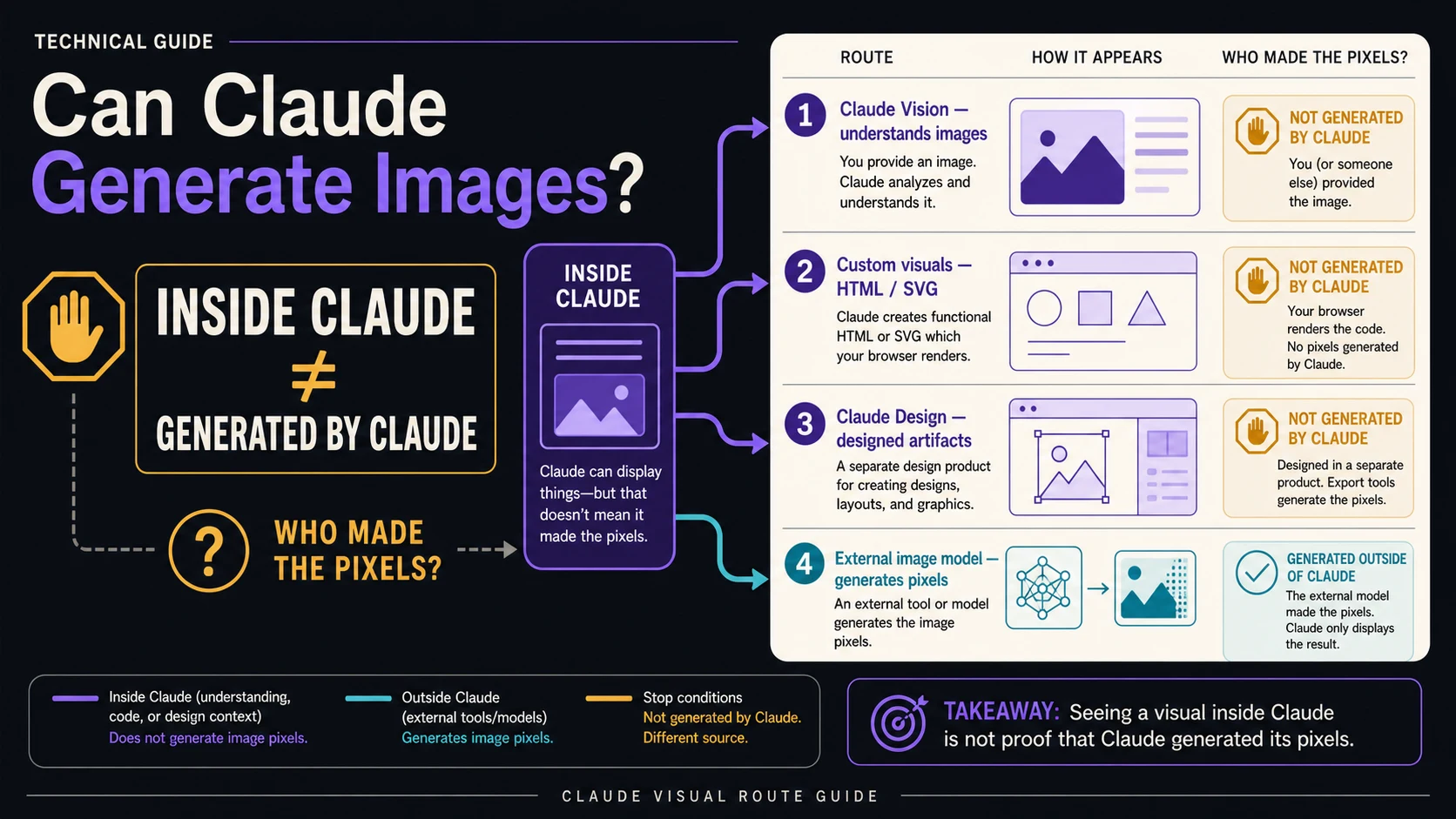
Claude does not natively generate or edit photos and illustrations. It can still create useful visuals in three different ways: build HTML/SVG diagrams in chat, use the separate Claude Design product for designed artifacts, or call an external image model through a connector. The practical question is not whether an image appears inside Claude, but which system made the pixels.
Use this ownership board before choosing a route:
| Surface | Who creates the result? | Best for | Stop if you need |
|---|---|---|---|
| Claude Vision | Claude analyzes an image you provide; it does not create new pixels. | Understanding screenshots, photos, charts, or documents | A new photo, illustration, or raster edit |
| Custom visuals | Claude writes functional HTML/SVG; the browser renders the visual artifact. | Diagrams, charts, comparisons, and interactive explanations | Photorealistic or painterly image synthesis |
| Claude Design | A separate Anthropic design product creates a designed artifact in its own surface. | Slides, prototypes, one-pagers, layouts, and visual variants | Proof that the base Claude model gained native image output |
| External image model | The connected service or image model generates or edits the pixels; Claude may plan or call the tool. | Photos, illustrations, raster edits, and image-generation APIs | A route whose generator, permissions, billing, or data handling you cannot identify |
If your final deliverable is an edited raster file or a production image API response, stay in the external-tool lane. Before connecting anything, name the generator, permission scope, billing owner, data path, and artifact rights; if one is unknown, stop before granting access.
What Claude can do with images—and where it stops
Claude's core image capability is understanding image input. You can provide a supported image, ask about its contents, compare visual details, extract information, or reason over a chart. The Claude API Vision documentation describes image inputs through base64 data, URLs, and uploaded files. Its image-generation FAQ draws the boundary just as clearly: the Claude model does not generate, edit, or manipulate images.
That boundary does not mean Claude is limited to plain text. Anthropic's “Can Claude produce images?” help page distinguishes photos and illustrations from diagrams, charts, and interactive visuals. Claude can construct the latter with web technologies. Those artifacts may look like images when rendered or exported, but their production contract is closer to code-generated graphics than to a diffusion model synthesizing a photograph.
The distinction matters because “supports images” can describe four different actions:
| Action | What goes into Claude | What comes out | Is this native photo generation? |
|---|---|---|---|
| Analyze | Screenshot, photo, chart, or scanned page | Textual understanding, extraction, comparison, or advice | No |
| Construct | A request for a diagram, chart, or interactive explanation | An HTML/SVG-style functional visual | No |
| Design | A brief, assets, and constraints in Claude Design | A layout, prototype, slide, one-pager, or design artifact | Not a new base-model photo generator |
| Orchestrate | A prompt plus permission to call an external tool | A tool result produced by that service | No; the external model creates the pixels |
If a workflow cannot tell you which of these four verbs it performs, do not use the word “generate” as proof of capability. Inspect the artifact and the tool path instead.
Four visual surfaces can look similar while doing different work
A rendered visual is the end of a chain, not a description of the chain. The same Claude chat can contain an uploaded JPEG, an HTML chart, a design preview, and a PNG returned by a connector. They may all look like “images in Claude,” yet each has a different creator and a different failure mode.
Claude Vision understands an image you already have
Vision is the correct route when the first verb is inspect, describe, compare, extract, or reason. You might upload a product screenshot and ask where the hierarchy breaks, provide a chart and ask for the trend, or show a floor plan and ask Claude to identify labels. Claude consumes pixels as evidence and returns analysis.
Vision is the wrong route when the required final file contains newly synthesized or edited pixels. Asking Claude to describe how a photo should change can be useful; expecting the Vision endpoint itself to perform that change is a contract mismatch.
Custom visuals turn reasoning into functional graphics
Claude's custom visuals are useful when the information is more important than photographic texture. A process map, decision tree, data chart, architecture diagram, comparison, or interactive explainer can be built as a web artifact. Anthropic's custom visuals help page describes an HTML-based beta surface with options such as copying a visual as an image and downloading SVG or HTML.
The export format can be an image, but the creation method is still code and layout. That makes custom visuals strong for crisp labels, relationships, and reusable vector output. It does not make them a substitute for a model trained to synthesize a cinematic scene, a painterly character, or a realistic product photograph.
Claude Design is a separate design surface
Claude Design is an Anthropic Labs product for visual artifacts such as screens, prototypes, slides, one-pagers, layouts, and campaign material. It has its own project surface, iteration workflow, and export or handoff paths. That product identity is important: a Claude Design result is not evidence that the ordinary Claude model or Claude API acquired native raster-image output.
Use Design when composition, typography, brand context, variants, and stakeholder review are central to the job. If that is your route, the dedicated guide on how to use Claude Design covers access checks, context packs, canvas iteration, export, and Claude Code handoff without duplicating that workflow here.
Connectors let Claude call an actual image generator
A connector or MCP server can expose an image model as a tool. Claude can turn the request into a tool call, supply or refine a prompt, receive the returned file, and discuss the result. In that chain, Claude is the interface or orchestrator; the connected image service is the generator.
Hugging Face's Claude and MCP image-generation walkthrough is a transparent example: Claude connects to Hugging Face tools that invoke external image models. The exact model names, account requirements, and usage terms can change, but the durable architecture is straightforward—Claude calls; another model renders.
That is why a headline such as “generate images in Claude” can be operationally true and technically incomplete. The missing sentence is “using which tool?”
Choose the route by the file you need at the end
Start with the deliverable, not the interface. “Make a visual” is too broad; “return an editable SVG process diagram” and “return a 2048-pixel product photo” point to different systems before a prompt is written.
For a diagram, chart, or explanatory comparison
Choose custom visuals when the result should communicate structure: boxes, arrows, labels, proportions, states, or data relationships. Ask for the audience, claim hierarchy, required labels, and export need. SVG is especially useful when the graphic must remain sharp or editable.
Choose a dedicated charting or design workflow instead if the data must be reproducible from a source dataset, the brand system is strict, or the artifact needs production accessibility review. Claude can accelerate the first useful version; it does not remove the need to validate numbers, labels, and reading order.
For a slide, prototype, one-pager, or campaign layout
Choose Claude Design when the job is a composed artifact rather than an isolated generated picture. Bring the copy, screenshots, design tokens, brand assets, target dimensions, and acceptance criteria. The more the output depends on a real design system, the less useful an open-ended “make it look premium” prompt becomes.
Stop and repair the inputs when the design must match an existing product but no component examples, tokens, final copy, or responsive constraints are available. Generating more variants does not compensate for missing design evidence.
For a photo or illustration
Choose a dedicated external image model. Claude can help write the brief, turn requirements into prompt variants, compare candidate outputs, or call the model through a connector, but the image model owns the pixel synthesis. If photographic realism is the main requirement, use a workflow designed for that output; the guide to realistic AI image generation explains the visual checks that matter after generation.
Record the model or service that created the file. This is not pedantry. It tells you where safety rules, content filters, usage charges, retention terms, provenance metadata, commercial rights, and support obligations originate.
For editing an existing raster image
Use an image model or editor with a documented edit operation. Claude Vision can analyze the source image and help formulate instructions such as “remove the reflection without changing the product proportions,” but the external editor must apply the pixel transformation.
Verify the route with a small test. Upload a non-sensitive image, ask for one obvious change, then inspect whether the system returns a modified file or merely describes the change. A textual plan is not an edited image, and a freshly generated approximation is not necessarily an edit that preserves the original subject.
For a production image API
Use a dedicated image-generation or image-editing API, with Claude optional as a planner or orchestrator. The production boundary should be explicit:
hljs textApplication request → Claude decides whether an image tool is needed → the application validates the tool arguments → a dedicated image API generates or edits the file → storage records the file, generator, request ID, and rights context → Claude can inspect or explain the returned result
Do not design the system around the assumption that a Claude text or Vision endpoint will begin returning image binaries. The application should own tool authorization, timeouts, retries, storage, moderation, billing attribution, and audit logs even when Claude chooses when to call the image service.
One request can follow three different execution paths
Suppose the request is: “Create a launch visual that explains how a support ticket moves from intake to resolution.” The words are identical, but the artifact reveals the route.
Path 1: custom visual. Claude creates an HTML/SVG flow with labeled stages and arrows. You can inspect the markup or export a vector artifact. The useful property is structured explanation, not photorealistic pixels.
Path 2: Claude Design. The request opens or runs inside a Design project and becomes a composed slide, one-pager, or campaign layout. The useful property is a design canvas with visual hierarchy and iteration context.
Path 3: connector tool call. Claude calls an external service, and the tool response contains an image file or file reference. The useful property is synthesized or edited pixels from the named external generator.
You can classify an unfamiliar workflow without trusting its marketing language. Ask five observable questions:
- Did Claude return code, an artifact canvas, or a tool response?
- Is there a named tool, server, model, or provider in the execution trace?
- What file type exists at the end—HTML, SVG, PDF, PPTX, PNG, JPEG, or WebP?
- Which account shows the usage or charge?
- Which service's terms govern prompts, uploads, outputs, retention, and rights?
The answers establish more than authorship. They tell you where to debug a failed generation. A malformed SVG, a Design export issue, a connector permission error, and an image-model refusal belong to different support paths.
Before you connect an image tool, identify five owners
Remote MCP servers and custom connectors can be useful, but they expand the trust boundary. Claude's custom connector guidance warns users to connect only trusted services and to review requested permissions. Treat the connector as software that may receive prompts, files, account context, or actions—not as a harmless label in a menu.
| Check | Question to answer before connection | Reject or pause when |
|---|---|---|
| Generator | Which service and model family perform the image operation? | The page implies “Claude image generation” but never names the pixel generator |
| Permissions | What data, files, sites, or actions can the connector access? | The scope is broader than the image job or cannot be reviewed |
| Billing | Whose API key, account, credits, or subscription will be charged? | The cost owner is hidden or a personal key must be pasted into an untrusted field |
| Data path | Where do prompts, reference images, and outputs travel or persist? | Retention, subprocessors, logging, or deletion behavior is unknown for sensitive material |
| Artifact rights | What can you save, export, modify, publish, or reuse? | The output license or commercial-use boundary cannot be located |
Use least privilege. Start with non-sensitive material, authorize only the operation required, and remove a connector you no longer use. Never assume that Anthropic's terms automatically cover the external service; each owner in the chain can add its own contract.
A connector also should not require blind trust in copied setup instructions. Confirm the official service domain, inspect the requested OAuth or API scope, and avoid exposing a broad production key when a narrower project key or delegated authorization is available. If the provider cannot explain the data and billing path, do not connect it merely to test a headline.
Where Claude Code fits
“Claude Code generated an image” can refer to at least three different operations:
- Claude Code wrote SVG, HTML canvas, Mermaid, or another code-defined visual that a runtime rendered.
- Claude Code ran an existing graphics program or project build that produced an asset.
- Claude Code called an external image-generation or editing model through a tool, SDK, or command.
Those routes are useful, but none proves that the base Claude model synthesized the pixels. The repository, runtime, graphics library, or external image service is part of the production chain. Keep that chain in the build record so a future maintainer can reproduce the asset and understand its licensing and cost.
For code-defined visuals, validate semantics just as you would validate code: confirm labels, values, colors with meaning, accessibility, responsive behavior, and export fidelity. For model-generated pixels, validate provenance, requested transformation, output dimensions, safety, and rights. Calling both “image generation” hides the different checks they need.
Common claims translated into precise capability statements
| Claim you may see | What it may actually mean | What to inspect |
|---|---|---|
| “Claude generates images now” | Claude displays a custom visual, opens Claude Design, or calls another image model | Surface name, artifact type, and tool trace |
| “Claude can create charts” | Claude constructs an HTML/SVG or interactive visual from instructions or data | Underlying values, markup, and export format |
| “Claude Design makes graphics” | A separate design product produces composed visual artifacts | Product route, project surface, and export path |
| “Claude Code makes unlimited images” | Code repeatedly renders assets or invokes an external model under another account's limits | Runtime, generator, billing owner, and rate limits |
| “Claude accepts images through the API” | The API can receive image input for understanding | Whether the documented response supports image output |
| “An MCP server adds image generation” | The server exposes an external generator as a callable tool | Server owner, model/service, permissions, data, and cost |
Precise language does not make the workflow less capable. It makes the workflow debuggable. When a result is wrong, you know whether to fix the prompt, data, SVG logic, Design context, connector arguments, model choice, or provider account.
A compact route recommendation
Use Claude Vision when you already have an image and need understanding. Use custom visuals when you need a diagram, chart, comparison, or interactive explanation. Use Claude Design when you need a composed design artifact with layout and iteration. Use an external image model or editor when you need photos, illustrations, raster edits, or an image API.
Then apply one final test: can you name who made the pixels? If the answer is “a connected service,” record that service beside the artifact. If the answer is “no one—the browser rendered HTML/SVG,” describe it as a functional visual. If the answer is unclear, pause before sharing sensitive data or building the route into production.
FAQ
Can Claude generate photos or illustrations by itself?
No. Anthropic's current help and API documentation describe Claude as able to understand images and create functional visual artifacts, not as a native photo or illustration generator. A photo or illustration returned through a connector is generated by the external image model behind that tool.
Can Claude edit an existing image?
The base Claude model can analyze the image and help write precise edit instructions, but it does not perform native pixel editing. Use an external editor or image model with a documented edit operation, then have Claude inspect or compare the result if useful.
Can Claude create SVG files?
Yes. Claude can write SVG or create a custom visual that can be exported as SVG, depending on the surface. That is code-defined vector construction, which is different from synthesizing a raster photo.
Does Claude Design count as image generation?
Claude Design creates visual artifacts in a separate Anthropic design product. It can be the correct tool for layouts, slides, prototypes, and one-pagers, but its existence does not turn the ordinary Claude model or Vision API into a native photo generator.
Can Claude Code generate images?
Claude Code can write code that renders visual files, run a graphics workflow, or call an external image model. Check the command, dependency, or tool response to see which system created the final pixels.
Can the Claude API return a generated image?
Current Claude Vision documentation covers image input for understanding and explicitly denies native image generation or editing. For production image output, call a dedicated image API and use Claude only where planning, prompt construction, routing, or result analysis adds value.
Is there a free native photo-generation allowance?
The question depends on the route. The base Claude model does not natively generate photos, so there is no native Claude photo-generation allowance to quote. Custom visuals, Claude Design access, connectors, and external generators each have their own changing access and usage terms. Verify the exact surface and account instead of relying on an “unlimited” or “free Claude images” headline. If you only need a low-friction browser experiment, compare the ownership and limits in a no-sign-up AI image generator guide before uploading anything sensitive.
What is the easiest way to tell whether an external model was used?
Look for a tool call, connector name, server trace, provider account charge, or returned image-file reference. If Claude only returned HTML, SVG, or a Design artifact, the workflow did not use a native Claude photo generator. If a separate service returned PNG, JPEG, or WebP output, that service is the pixel generator.