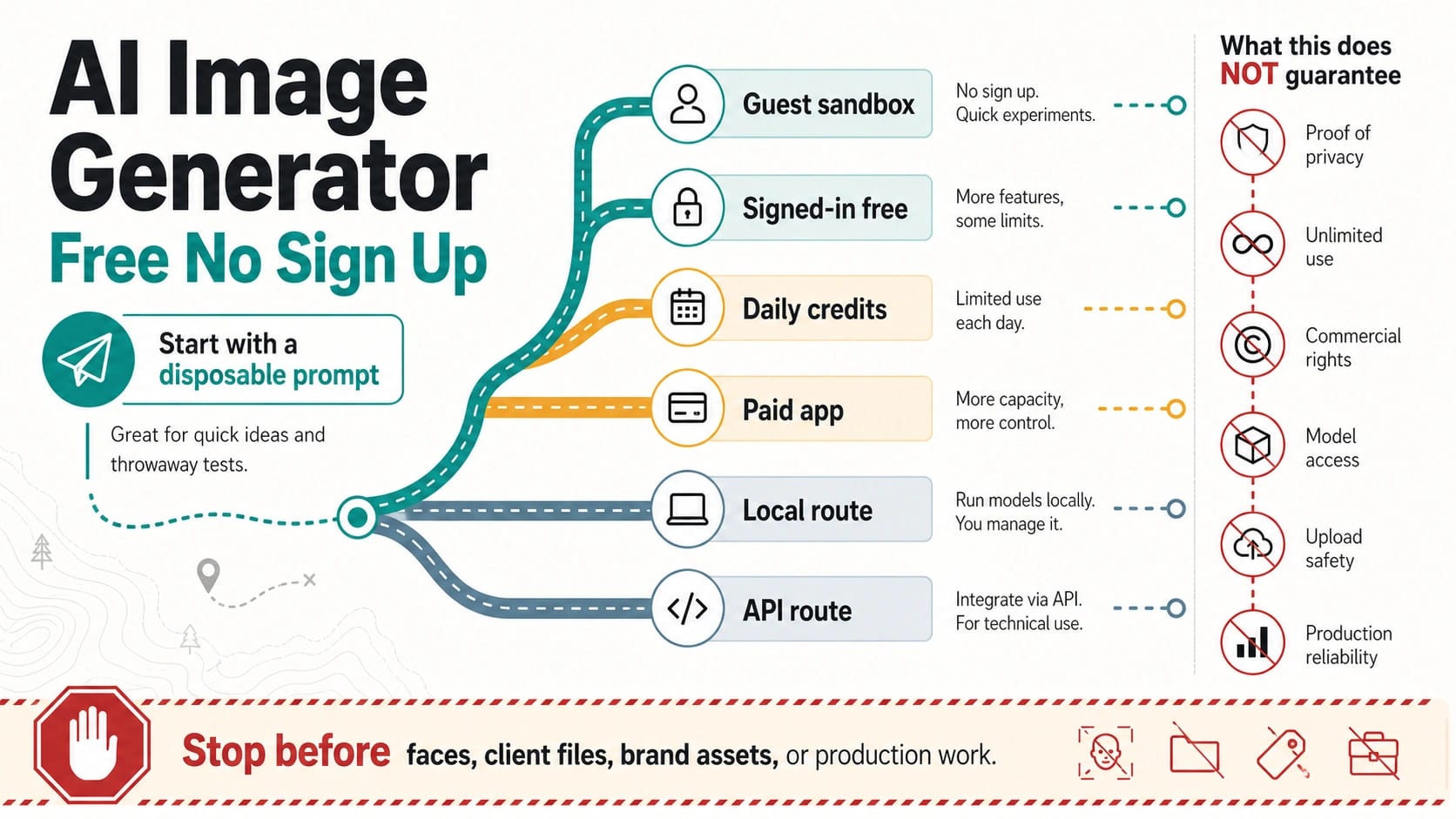
A free AI image generator with no sign up is useful for one low-risk prompt test, but it is not proof that the route is private, unlimited, commercially safe, or production-ready. Use it first for harmless text prompts; switch before uploads, client work, faces, product images, brand assets, or any workflow where rights, privacy, quality, support, or repeatability matter.
| Route type | Good first use | Check before trusting it | Stop or switch when |
|---|---|---|---|
| Guest sandbox | Disposable prompts and fast idea tests. | Owner, free limits, queue behavior, download quality, watermark, and output rights. | You need uploads, faces, client files, product assets, or reliable repeat use. |
| Signed-in free route | More stable casual testing when the account owner and plan are clear. | Free quota, model access, privacy terms, public-gallery behavior, and export limits. | The useful mode requires payment, a wait queue, or unclear data handling. |
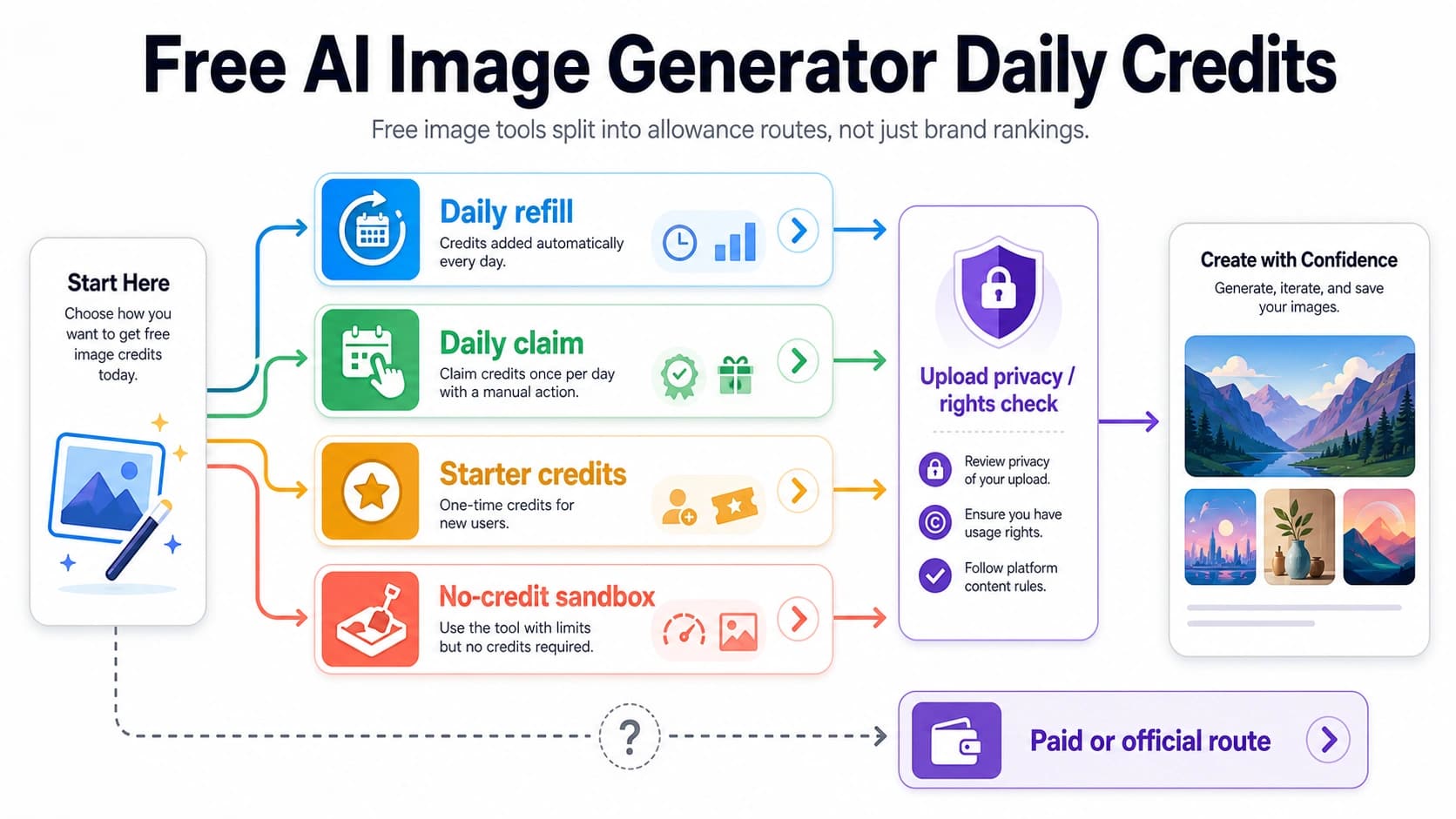
| Daily-credit route | Repeated practice across days. | Reset rules, rollover, model locks, paid upgrades, and whether uploads are safe. | Daily credits are not enough or real assets are involved. |
| Paid app route | Design work where plan, support, and rights are easier to verify. | Plan terms, commercial-use wording, upload handling, watermark, and cancellation limits. | The job needs no-account access or automation instead. |
| Local route | Sensitive experiments that should stay on your machine. | Hardware, license, model quality, update burden, and output rights. | You need cloud quality, team support, or repeatable production logs. |
| API route | Production workflows, automation, logging, and repeatability. | Billing, rate limits, data handling, support path, and model availability. | You only need one anonymous prompt test. |
The stop rule is simple: do not put real faces, client files, product images, private documents, unreleased brand assets, or paid-campaign work into a guest tool unless the route clearly explains data handling, rights, limits, and support.
Treat words like free, no sign-up, unlimited, private, commercial use, model access, HD output, and upload support as claims to decode. A no-account prompt box can be useful, but it is only the first step in choosing a safe image-generation route.
What No Sign-Up Does Not Prove
No sign-up removes a login step. It does not answer who operates the generator, what model is being used, how prompts and outputs are stored, whether generations can appear in a public gallery, whether uploads are retained, or whether the output can be used commercially.
That distinction matters because most people search for a no-account generator when they want speed. Speed is fine for harmless text prompts: a fantasy landscape, a sticker idea, a room concept, a social post draft, or a placeholder visual. It is a poor standard for anything that contains a real person's likeness, a product image, a client reference file, a private document, or an unreleased brand concept.
Use the first output as a route test, not as proof that the route is safe. Watch whether the tool asks for login after one or two generations, places the best models behind an account, shows a queue, reduces export quality, adds a watermark, changes aspect ratios, or hides the terms behind vague landing-page copy. Those signals are not automatically deal breakers, but they tell you the no-sign-up route has a smaller job than the page headline suggests.
| No-sign-up promise | What it proves | What it does not prove |
|---|---|---|
| Prompt box opens without an account | You can start a low-friction test. | Privacy, deletion, rights, model access, or long-term availability. |
| Free generation starts now | One route can run without immediate payment. | No daily cap, no queue, no paid mode, or no future account wall. |
| Unlimited language appears | The provider is marketing a low-friction route. | No fair-use cap, no dynamic throttling, no model lock, or production reliability. |
| Private wording appears | The provider wants trust language on the page. | Safe uploads, no retention, no training use, or clear deletion controls. |
| Commercial-use wording appears | The provider claims a rights position. | Terms-backed rights for your exact use, client work, ads, merchandise, or stock distribution. |
The practical boundary is simple: a guest sandbox is a place to learn whether a prompt direction is promising. It is not the place to test confidential material unless the route gives you a real privacy and rights contract.
Decode The Claims Before You Pick A Tool
Treat the tool page like a set of claims. The useful question is not "does it say free?" but "what does free mean here, and what proof is close enough for my image job?"
| Claim on the page | Safer reading | Proof to look for before relying on it |
|---|---|---|
| Free | The first generation or a basic mode may be free. | Free quota, model restrictions, export quality, watermark, queue, and upgrade boundary. |
| No sign up or no login | You may be able to start without an account. | Whether download, HD export, history, uploads, or repeated use later requires login. |
| Unlimited | There may be no visible counter for casual use. | Fair-use language, queue behavior, dynamic limits, model locks, and paid fast lanes. |
| Private | The route wants to reassure users. | Privacy policy, retention, deletion path, public-gallery rules, training use, and support contact. |
| Commercial use | The provider is making a rights claim. | Terms page, license wording, excluded uses, paid-plan differences, and user obligations. |
| Latest models | The page names fashionable model families. | Current model picker, owner docs, plan boundary, and whether model names are official or marketing shorthand. |
| HD or 4K | Some export path may produce large files. | Actual download size, watermark, paid upgrade, aspect ratio, and whether HD applies to free mode. |
| Upload support | The page may accept reference images. | Upload retention, deletion, file-size limits, face/product/client restrictions, and output rights. |
This claim-first reading protects you from two common mistakes. The first is treating a fast guest prompt as a privacy decision. The second is treating a generous landing page as a durable production route. If the job is casual, a partial answer may be enough. If the job is commercial, private, repeated, or client-facing, partial proof is a reason to switch routes.
Current Examples: Use Them As Filters, Not Rankings
The examples below were checked on June 19, 2026. They are useful because they show how no-sign-up pages frame the promise, not because they should be treated as a permanent ranking.
| Route example | What the page currently signals | How to use the signal |
|---|---|---|
| Creen AI | Free, unlimited, no sign-up/no login/no card language, plus model, output-size, quota, privacy, and terms links. | Strong exact-match example for fast tool intent; verify model access, output size, daily free mechanics, and rights before relying on it. |
| NoteGPT AI Image Generator | Free, unlimited, no-sign-up framing with broad model-name language. | Good reminder that model names and unlimited claims need a current tool-flow check, not just landing copy. |
| Raphael AI | Browser generation can start without sign-up/card; signed-in basic mode and daily-credit/queue mechanics are separated. | Useful because it shows why no-account start and signed-in unlimited-style usage are not the same route. |
| FreeGen | No signup, no hidden costs, no paywalls, and unlimited-image language. | Treat as a guest-sandbox candidate; check terms, fair-use boundaries, upload behavior, and rights before serious use. |
| Perchance AI Text To Image Generator | Free, no-sign-up, unlimited text-to-image positioning. | Strong low-friction prompt sandbox signal; do not infer upload safety or commercial rights from the prompt box alone. |
| Template.net AI Image Generator | No-sign-up and free language appears beside upgrade, gallery, reference-image, export, and sharing behavior. | Good counterexample: no-sign-up can coexist with account, quality, asset library, or upgrade workflows. |
| VisualGPT AI Image Generator | No-login free generation language plus commercial-ready style claims and visible pricing, privacy, terms, and credits-policy links. | Use the landing page as a prompt to inspect rights and credit terms before echoing commercial-use claims. |
| Flat AI | Private, no-sign-up, no-watermark, local-storage, daily-generation, sign-in, account, upgrade, and skip-queue language appear in the same route surface. | Useful mixed-contract example: "private" and "no sign-up" need privacy and flow verification before uploads. |
The pattern is more important than the brand list. A good no-account route answers the prompt quickly. A trustworthy route also explains the owner, limits, data handling, output rights, download quality, and support path. Many pages satisfy the first requirement; fewer satisfy the second requirement well enough for real work.
If all you need is a disposable prompt test, pick a guest tool that loads, enter a harmless prompt, and inspect the output. If the output matters, pause before you upload references, chase higher resolution, remove watermarks, or use the image outside a private draft. Those next steps change the route contract.
A Low-Risk No-Account Test Workflow
Use a no-sign-up image generator as a controlled test. The goal is to learn whether the route can make a usable first image without giving it anything important.
- Start with a harmless text prompt. Use an invented subject, a generic scene, or a public idea. Do not include a real name, face, client brief, private product, medical/legal/financial detail, or unreleased brand phrase.
- Generate one small batch. Watch queue time, failure behavior, visible counters, model choices, and whether the page asks for login before the first useful result.
- Download the output. Check file type, resolution, watermark, aspect ratio, and whether the better export route is free, signed-in, or paid.
- Look for the route owner. A footer, terms page, privacy page, support contact, or pricing page is more useful than a headline that says free.
- Check the claim that matters most to your next step. If you need commercial use, inspect rights. If you need uploads, inspect data handling. If you need repeat work, inspect limits and queue rules.
- Decide the route class. Keep it as a guest sandbox, move to a signed-in free route, use a daily-credit route, pay for a clearer app route, run locally, or move to an API.
This workflow sounds cautious, but it is faster than repairing a bad choice later. The expensive mistake is not generating a weak image. It is putting real material into a route that cannot tell you what happens to prompts, uploads, rights, or failures.
For prompt-only experimentation, a guest sandbox may be enough. For reference-image work, move to the upload-specific guide on AI image creators with uploads and no-limit claims. Upload support changes the privacy and rights decision because the file itself can contain sensitive information.
When To Switch Routes
Switch routes when the image job becomes important. The moment you need repeatability, rights clarity, privacy, upload control, customer-facing output, or automation, the no-sign-up advantage becomes less important than accountability.
Use these thresholds:
| Switch trigger | Better route | Why |
|---|---|---|
| You need more attempts tomorrow | Daily-credit route | A recurring allowance is easier to plan than an anonymous route that may throttle or disappear. |
| You need to upload a face, product, client file, or reference image | Upload-safe account, paid app, local route, or API | Uploads require data-handling and deletion clarity. |
| You need commercial or client use | Terms-backed paid or official route | Rights need clearer terms than landing-page marketing. |
| You need high resolution or watermark-free export | Signed-in, paid, or official app route | Guest mode often limits quality or reserves better exports for upgrades. |
| You need a private experiment | Local route or route with clear privacy terms | No sign-up alone does not prove private processing. |
| You need repeatable production output | API route | Production needs billing, logs, retries, model availability, and support. |
| You are chasing no-filter or no-restriction wording | Safety-aware route check | That job has different risks and should not be treated as a normal no-account generator search. |
If the recurring allowance is the real problem, use the sibling guide to free AI image generator daily credits. If the concern is broad "no restrictions" or no-filter language, use the separate guide to AI image generator no-restrictions claims and keep safety, consent, and policy boundaries in view.
If the job is not prompt-to-image at all, use a better-matched route. A random image generator fits placeholders, mood boards, and randomized visuals. A provider-specific route such as a Grok alternative for image generation fits readers replacing one app or plan. A model-specific question such as GPT Image 2 free unlimited access needs official or plan-bound evidence rather than a generic no-sign-up list.
FAQ
Are there free AI image generators with no sign up?
Yes. Several browser tools let you enter a text prompt and generate an image without creating an account first. Treat them as guest sandboxes unless the route also explains limits, data handling, output rights, download quality, and support.
Is an unlimited no-sign-up image generator really unlimited?
Not automatically. Unlimited can mean no visible counter for casual use, but there may still be fair-use limits, queues, dynamic throttling, model locks, paid fast lanes, or export limits. Check the owner page and tool flow before relying on it.
Does no sign up mean private?
No. No sign-up means you did not create an account before starting. It does not prove that prompts, uploads, outputs, logs, or generated images are private, deleted quickly, excluded from training, or protected by a support process.
Can I use images from a no-sign-up generator commercially?
Only if the terms for that route support your exact use. A page may say commercial use is allowed, but client work, paid ads, merchandise, stock uploads, brand campaigns, and regulated uses deserve a terms-backed answer.
Should I upload a photo to a no-login generator?
Avoid uploading real faces, client files, product shots, documents, or unreleased assets unless the route clearly explains upload handling, retention, deletion, rights, and support. For harmless reference tests, still use a disposable file first.
What about no-restrictions or no-censorship generators?
Do not treat no-restrictions language as a benefit by itself. Safety, consent, likeness rights, platform policy, and lawful use still matter. If that is the actual search job, read a safety-focused route guide instead of using a normal no-sign-up generator page as a bypass.
When should I use daily credits, paid apps, local tools, or an API?
Use daily credits for repeat practice, paid apps for clearer manual creative work, local tools when file control matters more than convenience, and APIs when you need production billing, logs, retries, model availability, and repeatable integration.
Is a no-account tool good enough for production?
Usually no. A no-account route can be good enough for one disposable prompt test. Production work needs accountability: a route owner, billing or plan terms, logs, support, rights, data handling, predictable limits, and a fallback when generation fails.