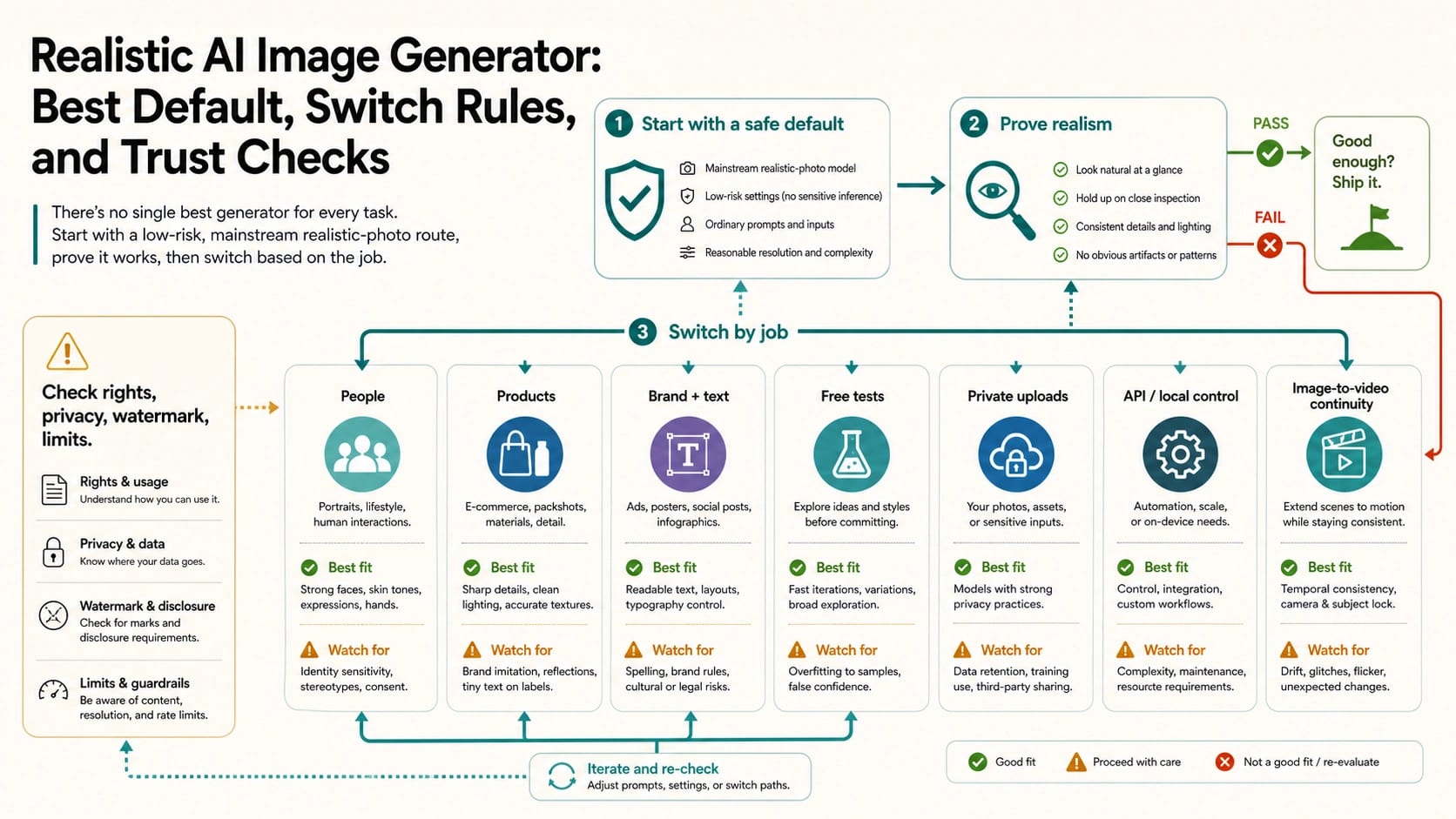
The best realistic AI image generator depends on the photo job. Start with an accountable mainstream image route that has visible terms and reference or editing controls, then switch when the work needs believable people, product fidelity, brand and text accuracy, free no-login testing, private uploads, API or local repeatability, or continuity into video. Use the route board first: it gives you the default path, the override cases, and the point where a different workflow is more useful than another prompt in the same tool. Treat realistic output as a proof set, not a style label: camera feel, lighting, skin, materials, identity consistency, text accuracy, editability, and the absence of obvious AI gloss all matter. Before uploading faces, client files, unreleased products, or anything intended for commercial use, check the provider's owner, privacy, public-gallery behavior, rights language, watermark, limits, support, and deletion path.
Start With A Default, Then Switch By Job
For a low-risk first test, use an accountable mainstream image route where the owner, terms, editing surface, and export behavior are visible. That can be a first-party app, a well-documented creative suite, or a model route with enough controls to test references and edits. The point is not that one brand wins every realistic image. The point is that your first route should make it easy to answer: who runs this, what can I upload, what happens to the output, and what should I switch to when the image job changes?
| Reader job | Better first route | Switch when |
|---|---|---|
| Ordinary realistic photo from a text prompt | Accountable mainstream text-to-image route | The output looks polished but staged, plastic, or over-cinematic |
| Realistic person or portrait | Route with reference editing, identity controls, and clear likeness boundaries | Skin, hands, expression, or identity consistency keeps drifting |
| Product or ecommerce photo | Product-aware edit or reference-image route | Materials, scale, shadow, angle, or packaging details are not preserved |
| Brand, layout, or text-heavy visual | Design or campaign workflow with stronger layout and text controls | Text, logos, product marks, or approval requirements matter |
| Free or no-login test | Low-risk sandbox with generic prompts only | You need uploads, rights, support, privacy, or repeatable quality |
| Private reference upload | Provider with explicit upload, retention, deletion, support, and rights language | The policy is vague or output may appear publicly |
| API, local, or repeatable workflow | Official API, controlled provider, or local/open-weight workflow | Volume, audit logs, privacy, retries, or integration matter |
| Image-to-video continuity | Image route that can preserve subject, frame, and prompt intent into video | The still image is only the first asset in a motion workflow |
The most common failure is starting with a vendor list before defining the job. If your task is a normal-looking portrait, a product page image, a branded ad mockup, a free prompt test, or a private reference edit, the same "realistic" promise means different things. A top-10 ranking collapses those jobs into one score. A route board keeps the decision honest.
What Realistic Should Prove
Realistic does not simply mean sharp, high contrast, or cinematic. Many AI images look impressive at thumbnail size and still fail as ordinary photographs. The proof is mundane: a believable camera angle, normal lighting, skin that is not waxy, hands and edges that survive inspection, materials that behave like materials, and a scene that does not feel over-directed.
Use these checks before trusting an output:
| Proof check | What to look for | Why it changes the route |
|---|---|---|
| Camera feel | Lens, depth, perspective, crop, and framing feel like a real photo | Over-staged images may need a different prompt style or reference route |
| Lighting | Shadows, highlights, reflections, and color temperature agree | Product and portrait work fails quickly when light is inconsistent |
| Skin and materials | Skin texture, fabric, glass, metal, food, packaging, and wood keep detail | Pretty output can still be unusable when surfaces look invented |
| Identity consistency | The same face, character, or product remains stable across variations | Consistency usually needs reference images, editing, or a controlled workflow |
| Hands and edges | Fingers, hairlines, jewelry, product seams, and small objects survive review | These areas reveal AI gloss faster than the center of the frame |
| Text and logos | Words, labels, signs, packages, and brand marks stay accurate | Text-heavy work may need a design route rather than pure image generation |
| Editability | You can fix one thing without damaging the whole image | If every revision breaks something else, switch route instead of re-prompting |
| Rights and output path | The provider explains use, ownership, watermark, and export limits | A beautiful image is not enough for client or commercial work |
The proof set also protects you from marketing language. "Photorealistic" is a useful search term, but it does not prove the output fits your job. A model that makes dramatic fantasy portraits may be worse for mundane ecommerce photos than a less flashy route with reference editing and better product control.
Realistic People Need A Likeness And Consent Route
People and portraits are usually where "realistic AI image generator" searches become most urgent. Readers want normal skin, consistent identity, natural expressions, plausible hands, and less synthetic gloss. The route choice should start with two questions: do you have consent for the person or likeness, and do you need the same person to remain recognizable across multiple outputs?
If the subject is fictional or fully synthetic, a mainstream prompt route can be enough for mood, pose, lighting, and character direction. If the subject is a real person, client, employee, public figure, or anyone whose likeness matters, the bar rises. You need consent, a clear upload policy, and a route that can explain how reference images are handled. If the route cannot explain storage, training use, public gallery behavior, deletion, and support, do not upload the face.
For believable people, test in this order:
| Step | Test | Switch signal |
|---|---|---|
| 1 | Generate one ordinary, non-glamour image with simple lighting | The result looks like a stock poster instead of a normal photo |
| 2 | Repeat the same face or character across two scenes | Identity, age, expression, or hairline drifts too much |
| 3 | Inspect hands, teeth, eyes, jewelry, clothing seams, and edges | Small details collapse even when the face looks good |
| 4 | Try one reference edit instead of another text prompt | The tool cannot preserve likeness or local edits |
| 5 | Check upload and output terms before using a real person | The provider cannot explain consent, privacy, deletion, or rights |
Community advice is useful here because it often points out what vendor pages soften: realistic humans fail when they look too polished, too smooth, too symmetrical, or too inconsistent across images. Use that pain as a test plan, not as proof that one tool is always the winner.
Product And Ecommerce Images Need Material Fidelity
Product realism is a different problem from portrait realism. A product photo has to preserve the product's shape, scale, material, packaging, shadows, and surface detail. If the image generator makes a shampoo bottle look beautiful but changes the label, cap, volume, or material finish, the output is not a usable product asset.
Start with a reference-image or editing route when the product already exists. Text-to-image can help brainstorm a setting, background, lighting style, or campaign direction, but it should not be trusted to preserve exact product identity without proof. If the product is conceptual, text-to-image may be acceptable. If the product is real, your test should include a source photo and a final review against the actual item.
Use this product route:
| Product need | Route | What to verify |
|---|---|---|
| Background idea | Text-to-image or creative suite | The output is only a mood or concept, not final product truth |
| Existing product photo cleanup | Reference edit or product-aware workflow | Shape, label, color, shadow, scale, and material remain stable |
| Ecommerce listing | Controlled photo/editing route | Terms, commercial use, watermark, export size, and brand review are clear |
| Packaging or label work | Design workflow, not only image generation | Text, barcode-like marks, logos, and legal copy are not hallucinated |
| Large catalog workflow | API, batch, or local pipeline | Repeatability, logs, retries, privacy, and quality review are manageable |
The safest rule is simple: if a product detail is part of the thing being sold, do not let the generator invent it. Use AI to test lighting, context, background, and composition, then verify the exact product, label, and material before publishing.
Brand And Text Work Need A Different Kind Of Control
Brand visuals and text-heavy images fail for reasons that pure photo realism does not catch. A model can create a believable office scene and still misspell the headline, distort a logo, invent interface text, or place brand elements in ways that a design reviewer cannot approve.
Use a design or campaign workflow when the image contains:
- readable headlines, UI labels, signs, package copy, posters, or social graphics;
- a logo, product mark, mascot, brand color, or approved typography;
- campaign variants that must stay consistent across channels;
- client approval, legal review, localization, or output resizing.
In those cases, the realistic-image route should be treated as one layer of the workflow. Let the generator explore lighting, scene, product context, and photographic feel, but use a toolchain that can preserve or edit text and layout with control. If a generated board has spelling issues, regenerate it inside the image workflow or move the text-heavy work to a design route; do not pretend a patched image proves the generator can handle the text itself.
Free Or No-Login Routes Are For Low-Risk Tests
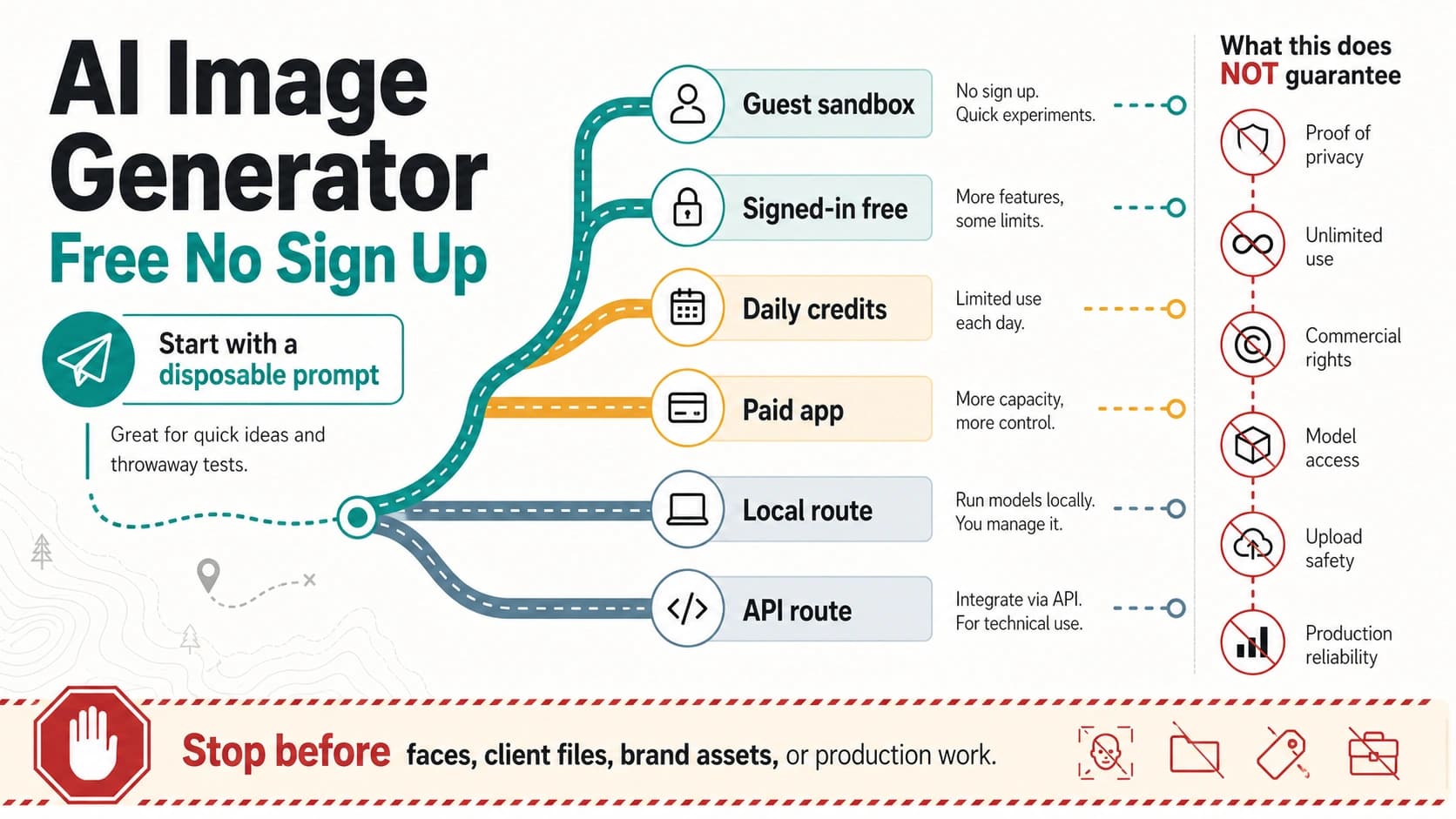
Free, no-login, no-watermark, and unlimited-sounding pages are tempting because they reduce friction. They are not automatically private, commercially safe, durable, or production-ready. Treat them as low-risk testing routes unless the owner, terms, storage behavior, output rights, limits, support path, and watermark/export rules are visible enough for your use.
Good low-risk tests include fictional prompts, style exploration, background ideas, non-sensitive mood boards, and prompt learning. Bad tests include faces, client assets, unreleased products, private documents, medical or legal context, brand files, and anything where the output may need commercial rights or deletion later.
| Claim | Safer reading | What to check |
|---|---|---|
| Free | The first route may cost nothing or use an allowance | Renewal, limits, model access, export locks, watermark, and paid steps |
| No login | You may not need an account to generate | Storage, logs, public gallery, deletion, support, and upload handling |
| Unlimited | The page may not show a visible counter | Fair-use rules, hidden throttles, queue behavior, quality downgrade, and abuse controls |
| Private | The provider may claim protected uploads | Retention, training use, deletion scope, public output settings, and guest rules |
| Commercial use | The provider may allow some downstream use | Input rights, output license, brand restrictions, model limits, and jurisdiction risk |
If daily recurring free use is your real job, use the focused free AI image generator daily credits guide. If the search is really about no restrictions, no filters, no sign-in, or unlimited claims, use the AI image generator no restrictions guide instead. Realistic-photo route choice is a different job; those siblings own the narrower claim audits.
Private Uploads Need A Stop Rule
The moment you upload a reference image, the route becomes a data-handling decision. The input may contain a face, private room, product prototype, client document, brand asset, or unreleased campaign. The image result may also appear in a public gallery, stay in a job history, train future systems, or become hard to delete if the tool has no account or support path.
Stop before upload if you cannot answer these questions:
| Question | Acceptable signal | Stop signal |
|---|---|---|
| Who runs the route? | Company, product, or open-source owner is identifiable | Owner is hidden or unclear |
| What happens to input files? | Retention, training use, and processing language are written | Upload handling is silent or vague |
| Are outputs public? | Public/private default is clear | Free outputs may appear in a gallery without clear control |
| Can I delete or export? | Account, job history, deletion, and export paths exist | No deletion route or support path is visible |
| What are the usage rights? | Terms explain output use and limits | Commercial, brand, or client usage is unclear |
| What happens when it fails? | Support, refund, retry, or escalation route is documented | Failures disappear into an anonymous tool |
For personal practice, vague answers may be tolerable if the prompt and input are generic. For client work, product work, real people, or business assets, vague answers should push you toward a more accountable provider, an official route, or a local workflow with controlled storage.
API, Local, And Repeatable Workflows Solve Different Problems
API and local routes are not automatically more realistic. They solve control problems: repeatability, integration, logs, batch jobs, privacy posture, cost accounting, retries, model pinning, and review workflows. If those are not your problems, a browser route may be faster. If they are your problems, browser free tools will usually waste time.
Use API or local control when:
- the same style, product, or character must be generated repeatedly;
- images are part of a web app, ecommerce system, design pipeline, or video workflow;
- prompts and outputs need logging, review, or rollback;
- upload exposure needs to be reduced or controlled;
- you need to compare official routes, provider routes, and open-weight models under the same test prompt;
- queue behavior, failure handling, and support matter more than one impressive sample.
Official API docs, first-party product docs, and provider help centers should own route facts. Third-party pages can be useful route examples, but they should not define another model's availability, price, limit, privacy, commercial use, or output rights. If you need a GPT Image 2 specific access or limits answer, move to the GPT-specific sibling pages rather than turning a route selector into an API tutorial.
A Proof Workflow For Your First Test
Do not test a realistic AI image generator with one flattering prompt and one lucky output. Use a small test loop that exposes failure modes early.
Run this sequence:
- Write one ordinary prompt. Ask for a mundane, normal-looking photo rather than a cinematic showcase.
- Generate two or three variations. Check camera feel, lighting, skin, materials, hands, edges, text, and scene logic.
- Add one reference image only if uploads are safe for this job. Check whether the subject, product, or composition is preserved.
- Change one requirement: person consistency, product material, readable text, private upload, batch repeatability, or video continuity.
- If the same route fails the changed requirement twice, switch route instead of trying ten more prompts.
| Failure you see | Likely route change |
|---|---|
| Beautiful image, but too glossy or staged | Prompt style, reference route, or a model better at ordinary camera realism |
| Same person changes across outputs | Reference editing, identity workflow, or different people/portrait route |
| Product shape or label changes | Product-aware edit workflow or controlled design route |
| Text or logo breaks | Design/text route, not pure photo generation |
| Upload policy is unclear | Do not upload; use accountable provider or local workflow |
| Browser route cannot repeat outputs | API, local, or workflow tool with logging and controls |
| Still image needs motion continuity | Image-to-video route with subject and frame preservation |
The switch threshold is the practical heart of the workflow. A realistic-image generator is not failing because it cannot solve every job. It is failing when you keep using the same route after the job has clearly changed.
When A Sibling Guide Is The Better Answer
Broad route choice should stay broad on purpose. If your question is narrower, use the focused owner for that job:
- repeated free allowances and daily credits: free AI image generator daily credits;
- no restrictions, no filter, no sign-in, unlimited, privacy, or commercial-use claim audits: AI image generator no restrictions;
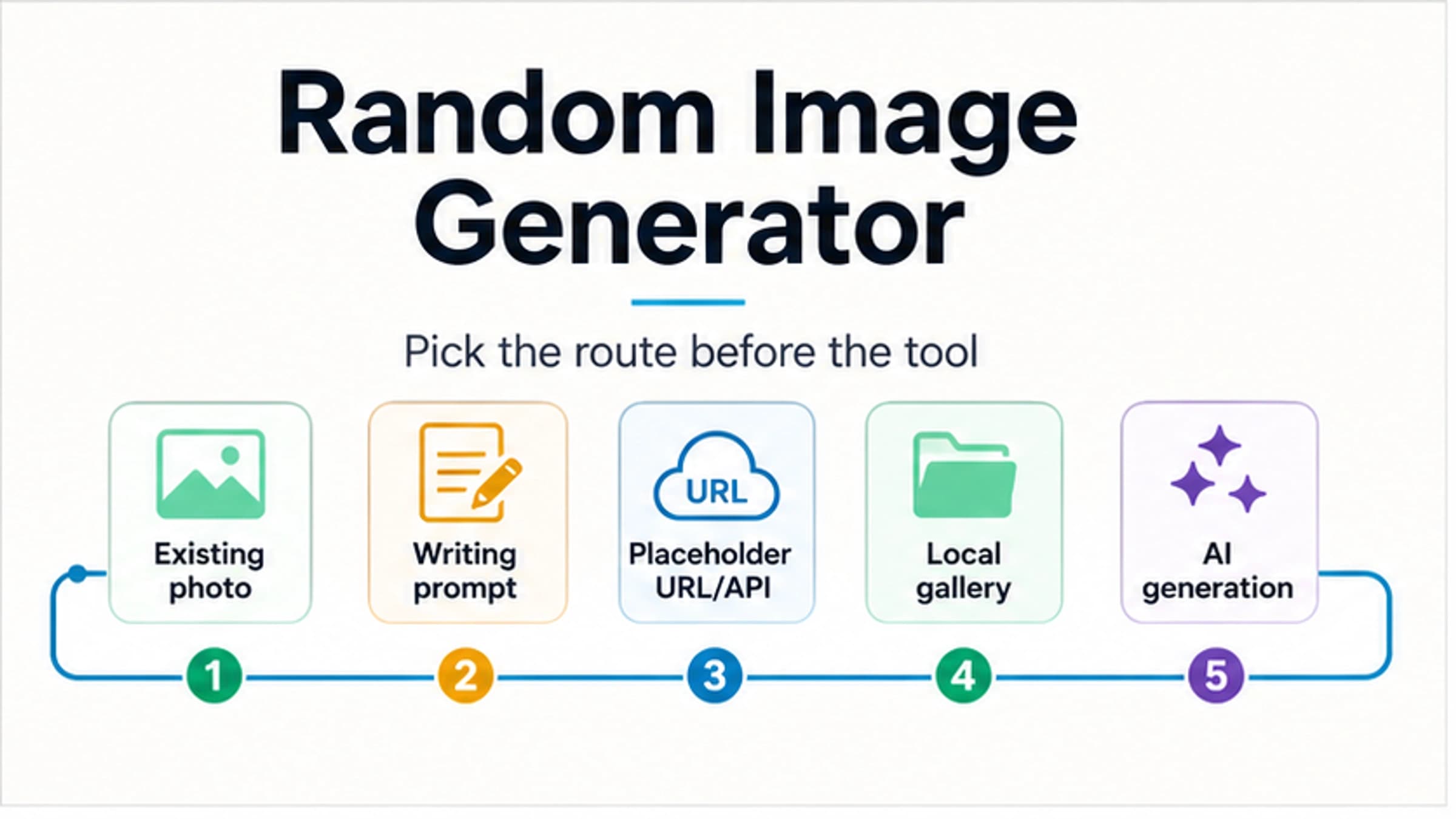
- random existing photos, placeholder images, local galleries, or writing prompts: random image generator;
- OpenAI versus Google route comparison: GPT Image 2 vs Nano Banana Pro;
- still-image-to-video route choice: AI image to video generator free.
Those handoffs keep the route selector from becoming a shallow roundup. The broad answer is route choice. The narrow pages handle credits, restrictions, random-image workflows, pairwise model comparisons, and video continuity in more detail.
FAQ
What is the best realistic AI image generator?
There is no single best realistic AI image generator for every job. Start with an accountable mainstream image route for a low-risk first test, then switch for realistic people, product fidelity, brand/text control, private uploads, API/local repeatability, or image-to-video continuity.
Is ChatGPT good for realistic AI images?
ChatGPT can be a practical route when you want conversational prompting, image editing, and a first-party OpenAI surface. It should still be tested against the same proof set: camera feel, lighting, skin, materials, identity consistency, text accuracy, editability, and terms for the route you use.
Which AI image generator is best for realistic people?
Use a people or portrait route only after consent and likeness boundaries are clear. The best route is the one that can preserve identity, skin texture, expression, hands, and reference edits while also explaining upload privacy, output visibility, deletion, and rights.
Is a free realistic AI image generator safe to use?
It can be safe for low-risk generic prompts, but free or no-login does not prove privacy, commercial rights, support, or durability. Do not upload faces, client files, unreleased products, or brand assets until the provider explains owner, storage, public gallery behavior, rights, watermark, limits, support, and deletion.
Why do Reddit recommendations matter for realistic AI images?
Forum discussions are useful because they surface real pain: plastic skin, over-polished outputs, identity drift, and images that look impressive but not believable. Treat those discussions as test criteria, not as proof that one generator is always best.
Do I need image-to-image for realistic results?
Use image-to-image or reference editing when you need to preserve a face, product, angle, material, room, or composition. Text-to-image is often enough for broad ideas, but reference routes are usually better when fidelity to a source matters.
Can I use realistic AI images commercially?
Only if the route's terms, input rights, output rights, watermark/export rules, and any brand or model restrictions support your use. Do not assume commercial use from image quality, free access, or a provider's marketing phrase.
When should I use a local or API route?
Use local or API routes when repeatability, privacy control, logs, retries, batch work, integration, or cost accounting matters. They are control routes, not automatic quality winners, so test the same prompt and proof criteria before moving production work there.